Beware of fake job offers and payment requests. We only use official email IDs and never conduct interviews on messaging apps.Beware of fake job offers and payment requests. We only use official email IDs and never conduct interviews on messaging apps.
Summary: Using Google Maps advertising makes it easier for your business to be found by people looking for products similar to what you offer. Read on to learn how Google Maps ads can help your business grow.
Key takeaways:-
When users search for a business related to yours on Google Maps, you can place a local ad featuring your business.
You can use promoted pins or sponsored search results to boost your business’s visibility.
Following a step-by-step guide can help you create, run and modify your search ad strategies using Google Maps.
Google Maps ads help increase business awareness and drive footfall to physical stores.
The cost of advertising on Google Maps can vary based on your business objective, budget, audience and other variables.
Google Maps is one of the most commonly used platforms that Google has created. Besides looking for street names, your customers use Google Maps to look for information on businesses, contact information and several types of service providers. As a business owner, optimizing ad campaigns for Google Maps is the best way to increase business awareness and footfall in your physical stores. This article will tell you everything you need to know about Google Maps advertising.
Table of Contents
What are Google Maps Ads?
Google has several platforms besides its search engine where businesses can promote their offerings. Google Maps is a leading platform for online advertising that allows businesses to increase awareness about their physical stores and services.
For example, consider that you own a business that sells men’s clothes and shoes. When a user searches for ‘shirts for men’ on Google, a local Google Maps ad will feature your business at the top of the search results. You can set your business objective as awareness or visits before running your ad campaign.
Google Maps ads are an effective way to improve visibility for your business. Google Maps is one of the top navigation apps for Android, iOS and Windows devices across the world, which has been downloaded more than 10 billion times. Additionally, research data shows that customers using Google to look up local businesses increased from 63% in 2020 to 81% in 2021, a significant jump for that period.
Discover What Your Customers Search ForDiscover What Your Customers Search For
Get insights on evolving customer behaviour, high volume keywords, search trends, and more.
If you’re familiar with Google PPC (pay-per-click) ads, you will find it easy to run Google Maps ads, since they are very similar. Regardless of proximity, both these types of ads show up right at the beginning of the search results that show up. These ads are significant in improving your physical store’s awareness and driving more footfall. With the right local SEO services company to help you plan your Google ad campaign, you can easily add Google Maps as an ad platform to your overall paid media campaign.
There are a couple of different formats in which you can run Google Maps ads. These are:
Promoted Pins
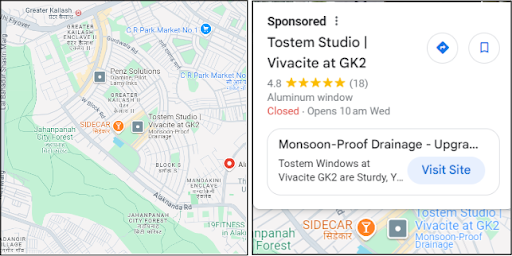
When a user is browsing the map by area, your store or outlet will be displayed as a promoted pin. This will appear as a square pin, distinct from all other indexed locations that appear organically in the app. In the example below, when you click on the pin for Tostem, the sponsored ad opens up.
Promoted Pins along a Route
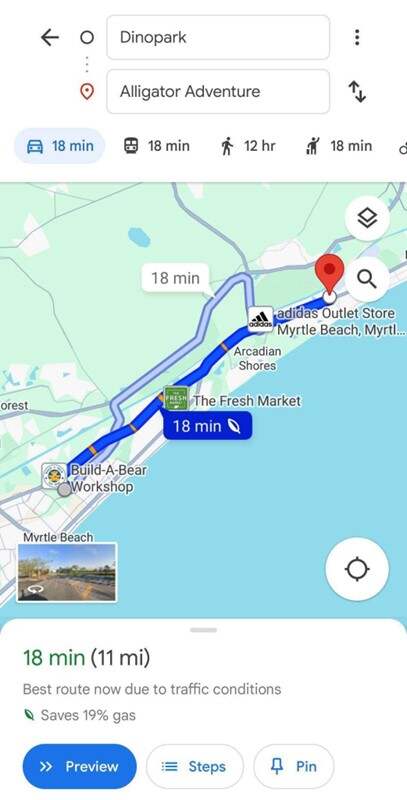
These pins appear prominently even when your target audience is using Google Maps for navigation. A sponsored listing would appear along their route on the app, nudging them to stop by before reaching their destination.
Sponsored Search Results
When a user searches for a specific destination, they see the sponsored ads right at the top of the search results. This is similar to PPC ads that you would run on Google for paid search ads.
Why Google Maps Ads Matter for Local Businesses?
Google Maps Ads are essential for local businesses aiming to increase visibility and attract more customers. Here’s why:
Increased Local Visibility: Appear at the top of search results, making it easier for customers to find you.
Targeted Audience: Reach potential customers within your geographical area with precise targeting.
Mobile-Friendly: Most users search for businesses on their mobile devices, where Google Maps Ads are prominent.
Higher Conversion Rates: Local users are more likely to convert to customers after discovering your business via Google Maps.
Competitive Advantage: Stand out from competitors by leveraging Google’s highly trusted platform.
These factors make Google Maps Ads a powerful tool for driving foot traffic and boosting sales.
Step-by-Step Guide to Setting Up Google Maps Ads
Getting started with Google Maps ads is not difficult. Once you understand that, you can get an SEO expert to help you run and manage larger campaigns. Here are the four simple steps to help you hit the ground running.
Configure and update your Google Business Profile
Create a new location asset
Start a new Google Ads campaign
Review your location asset analytics and make any necessary changes
Let us look at each of these steps in detail.
1. Configure and update your Google Business Profile
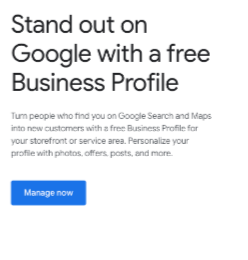
You might not have a Google Business Profile or have one that is incomplete. If yes, start with this step. If your business is already indexed or registered with a Google account, you can search for it directly using the search tool.
Once you have created one, go a step further and optimize your profile. Besides your registered business name, add more information like opening hours, a business description, website link and other interesting information you would like users to see. You can also choose to have a chat feature.
2. Create a new location asset:
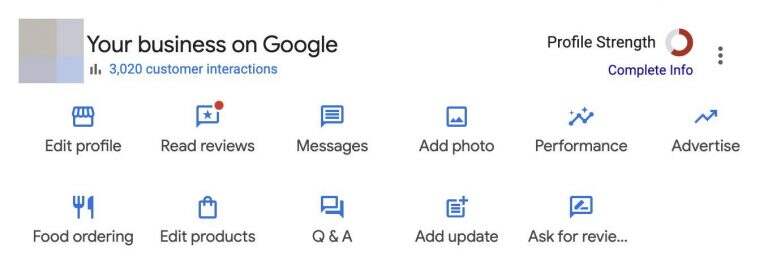
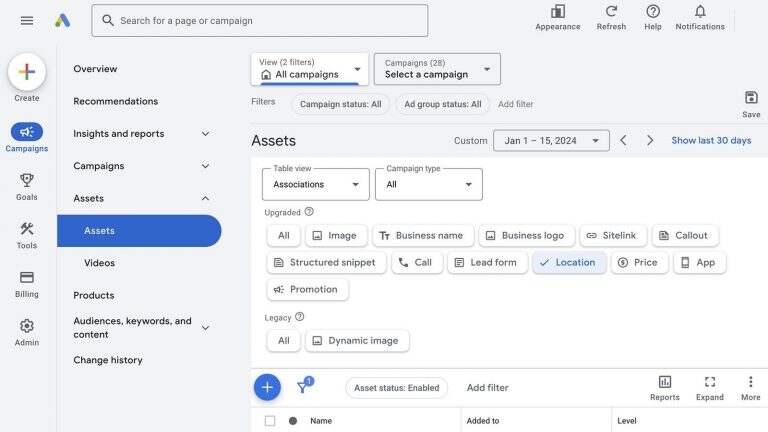
Once your business website is set up and running, you need to link it to your Google Ads account’s location asset. If you need to create a new asset, start by opening the location assets dashboard. You should see a screen like the one shown below.
Click the blue ‘+’ icon to make a new asset. Next, confirm your Business Profile Manager account and ‘Continue’. Or, you could choose ‘Chain Stores’ while selecting a pre-existing group of stores if your PPC campaign is for a multi-location outlet.
3. Create a new Google Ads campaign:
The next step is to create a new ad campaign targeting local customers. Most hyperlocal advertisers use either Performance Max or search campaigns. However, smart campaigns can help you with a more automated setup.
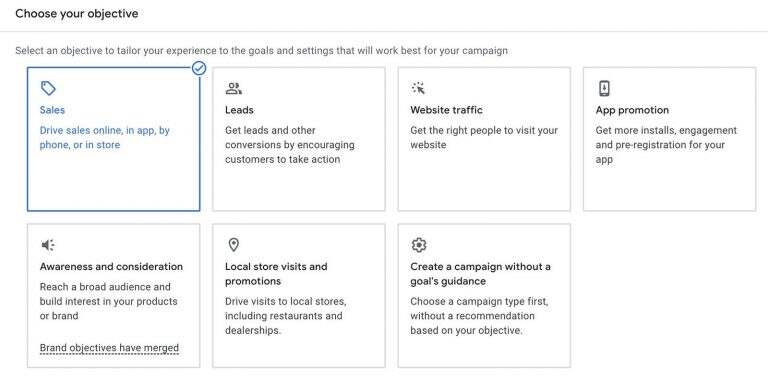
While setting up your campaign, first pick the objective you are trying to achieve.
You can choose more than one goal, combining both offline and online options to target different permutations of phone calls, conversions and store visits. Once you have chosen your bid strategy, set up location-based customer targeting. The next step would be to upload a list of keywords for your Google search ad group. If you haven’t created a list yet, use the product/services list or the URL scanner to get a better idea of the keywords you should target. You can use hyperlocal keywords to reach a highly focused group of people that would make the ideal target audience.
Finally, you need to create at least one Search ad. Enter any number of descriptions and headlines you want which can help in optimizing ad ranks, improve results and increase efficiency.
4. Review location asset analytics and make any necessary changes:
Once your Google Maps ad campaign is up and running, it’s over, right? On the contrary, it’s time for the most important step. Continuously tracking and monitoring your asset dashboard to see how your location asset is performing is one of the most important steps of the process. Google Ads reports help you track the kind of engagement you’re getting the most – calls, directions or other details. You can take this data and use it to improve your campaign and ensure every asset drives the right business objectives.
Benefits of Google Maps Advertising:
Google Maps has over 10 billion app store downloads and is used by over a billion people every month. This is proof enough that any advertisements on this channel will garner more views than most other platforms. As discussed before, the two key benefits of Google Maps ads are increasing business visibility and driving footfall to the store. Take a look at how these will impact your business.
1. It enhances your business’s visibility and increases visibility:
Reaching a specific group of customers requires ads placed strategically across Google. Google Maps ads are the way to go if you want to reach local customers without buying a whole billboard ad. Investing in ads on Google Maps also improves your business’ search performance, increases enquiries at the store and more clicks on your website. These three areas significantly and positively impact your business growth. Google Maps ads put your business where customers are looking, ensuring certain brand awareness and visibility growth. which directly enhances your business’s local visibility.
2. It increases footfall at your physical store locations:
Shoppers today don’t just reach Google to shop online, but also to find nearby physical stores where they can get what they need. Combine this with a new segment of remote and hybrid-working employees who can visit stores during the week at hours that were odd before. As a result, marketers are more incentivised to run search ads locally to reach these mobile customers at key moments of influence.
Local Google search ads pop up before customers at the right time based on data insights to influence their buying decisions. Businesses and marketers using these ads have reported that their sales volumes increased by 9.1%, while sales sizes grew by 8.3%.
3. Easily build trust with your customers:
Local Google Maps ads need to pass Google’s thorough screening process, which means only legitimate businesses can run Google Maps ads. Consequently, consumers who reach you through this platform are likelier to trust and complete a purchase.
4. It brings customers directly to you:
When you run a PPC ad on Google, your customer first goes to your website, and must then navigate to the store section and get the directions to your store. However, with Google Maps ads, the first thing a customer sees is the route to your location. This makes it the best way to drive footfall to your store.
Expert Tips to optimize Google Maps ads
To get the most out of your Google Maps ads, consider these expert strategies:
Claim and Optimize Your Google Business Profile – Ensure your Google Business Profile is fully updated with accurate business hours, contact information, and photos. An optimized profile increases the chances of appearing in local search results.
Use High-Quality Photos – Visual appeal is crucial. Upload clear, high-quality images that showcase your products, services, or location to attract more clicks and engagement.
Encourage Customer Reviews – Positive reviews improve your visibility and credibility. Ask satisfied customers to leave reviews, and respond to them promptly to show you’re engaged and trustworthy.
Focus on Local Keywords – Use local SEO keywords in your business description and ads to ensure you’re targeting the right audience. For example, include your city or neighborhood for more precise targeting.
Utilize Google Ads Location Extensions – Location extensions display your business address directly in the ad, making it easier for users to find you. Make sure your business location is accurate.
Set Up Geotargeting – Target specific geographic areas to ensure your ads reach people in your local vicinity or nearby locations. This helps you stay relevant and reduce wasted ad spend.
Optimize for Mobile Devices – Most Google Maps searches happen on mobile devices. Ensure your landing pages are mobile-friendly, fast-loading, and easy to navigate.
Monitor and Adjust Your Campaigns – Regularly analyze your campaign’s performance. Check metrics like click-through rates (CTR), conversions, and user engagement to identify what’s working and optimize accordingly.
Leverage Google My Business Posts – Use Google My Business Posts to share updates, promotions, or events. These posts can appear directly in Google Maps search results, driving additional attention to your business.
Track Metrics and Test Ads – Continuously test different ad copy and images to see what resonates best with your audience. Also, track important metrics like phone calls, directions requests, and website visits to assess the effectiveness of your ads.
Cost of Running Google Maps Ads
As with Google PPC ads, there is no one-size-fits-all, instant-result solution to calculate how much your Google Maps ad will cost. Maps follow a complex pricing structure that varies based on multiple factors. Yes, it can be frustrating not to have all the answers, but it is critical to understand all the variables that will influence the price of your Google Ads campaign. Some of these factors are market trends, keywords, media budget, keywords and bids, market niche and your quality score.
How Do You Measure the Success of Your Google Maps Ads?
There are several metrics you can use to measure the success of your Google Maps ad campaign. The most popular ones are:
The total number of trips completed per user, measured on a daily, weekly or monthly basis
The number of real-time traffic update searches per user per day, week or month, and Google Maps real-time location searches can help measure the ad’s effectiveness in guiding customers to your business.
The number of search-along-route queries per user per day, week or month
Future Trends in Google Maps Advertising (2025)
As we look ahead to 2025, Google Maps advertising is expected to evolve with emerging trends that will shape local business marketing. Here’s a glimpse into the future:
AI-Powered Personalization – Ads will become more personalized through AI, offering hyper-targeted messaging based on user behavior and preferences.
Augmented Reality (AR) Ads – Expect to see interactive AR ads that enhance user experiences, allowing customers to virtually explore businesses before visiting.
Voice Search Integration – With more voice-activated devices, businesses will optimize for voice search, offering hands-free discovery.
Enhanced Location-Based Targeting – Location targeting will become more precise, allowing businesses to reach users in real-time and within specific zones.
Navigate Your Google Maps Ads With an SEO Expert:
By now you know that there are clear benefits and advantages to promoting Google Maps ads. You can also benefit from in-store promotions, local inventory search options and other features to improve sales. With the right SEO services expert, your Google Maps campaign can take your business to new heights faster than you can imagine. Get in touch with our team today.
Frequently Asked Questions (FAQs)
Can I target specific areas with Google Maps ads?
Location targeting allows you to choose specific locations where you would like your ad to be shown. For instance, you can choose a whole country, city, district, or even a small geofenced location.
Do I need a Google My Business account to advertise on Google Maps?
You can run ads on Google Maps without a business website, but you need a Google My Business account to get started.
How can I link Google My Business with Google Ads?
Taking it one step at a time,
Click on the Campaigns button in your Google Ads account.
Tap the Assets dropdown menu.
Click ‘Assets’.
Click the ‘+’ button and then ‘Location’ asset
Choose Link to a Business Profile Manager account I know.
Choose the right Business Profile
Which types of businesses benefit the most from Google Maps ads?
Local service-based businesses that need more real-time customers and leads benefit the most from Google Maps ads.
Sarvesh Bagla is an enterprise SEO expert and industry leader who has driven transformational digital growth for India’s top brands across the BFSI, Healthcare, Automotive, and ECommerce industries. As the Founder and CEO of Techmagnate, he leads large-scale organic search strategies and performance marketing campaigns for businesses looking to succeed in today’s AI-driven search landscape.
A strong advocate for thought leadership, Sarvesh is deeply involved in SEO evangelism and regularly contributes to industry discussions through LinkedIn, webinars, and CMO roundtables. His focus today is on helping brands prepare for an AI-first SEO future (AEO, GEO) and strategies for Large Language Models (LLMs) at the core.
Get the most valuable search related insights about leading brands, trending keywords, search volumes, fastest growing categories, city-level insights and much more!
It has come to our notice that fraudulent job offers are being circulated on the internet through messaging apps like WhatsApp and Telegram, which falsely claim to be from Techmagnate. We take this matter seriously and would like to caution all candidates to be wary of such postings.
Please Note That –
We do not charge any fees/security deposit/payment from candidates, irrespective of the professional experience they hold, for job applications or interviews
Official communication channels include our website and verified social media accounts, primarily LinkedIn.
Kindly double-check the domain name – @techmagnate.com – in the email address
We follow a transparent and ethical approach for hiring/onboarding supported by proper documentation.
Ensure that you only apply through verified channels to avoid being scammed. We also recommend that you exercise caution when sharing personal information or financial details with any job posting or recruitment agencies claiming to represent us.
We want to ensure that potential candidates interested in joining Techmagnate have a safe and positive experience.
If you find that someone that fits the description above has reached out to you, please notify us immediately at jobs@techmagnate.com.
 Important Alert:
 Important Alert: