Beware of fake job offers and payment requests. We only use official email IDs and never conduct interviews on messaging apps.Beware of fake job offers and payment requests. We only use official email IDs and never conduct interviews on messaging apps.
Summary: This blog post serves as a comprehensive guide for individuals preparing for technical SEO interviews. It delves into essential topics such as schema markup, Core Web Vitals, JavaScript SEO, website architecture, XML sitemaps, and international SEO strategies.
The article emphasizes the importance of understanding technical SEO concepts, staying updated with industry trends, and continuously enhancing one’s skills to remain competitive in the evolving SEO landscape. By mastering these areas, candidates can effectively demonstrate their expertise and readiness for technical SEO roles.
Key takeaways:-
A well-structured website with clear navigation improves SEO by helping search engines find and index pages efficiently.
They provide a roadmap of the site’s structure, aiding search engines in discovering and indexing pages.
Implementing structured data helps search engines understand the content better, enhancing visibility in search results.
Optimizing for different countries and languages involves using hreflang tags, content localization, and appropriate domain strategies.
Technical SEO is an evolving field; staying updated with the latest trends and techniques is crucial for ongoing success.
Technical SEO interviews test whether you can keep a site crawlable, indexable, and fast – the foundations every search ranking is built on. As businesses double down on organic and AI-driven visibility in 2026, demand for skilled technical SEO professionals keeps rising, and so does the bar in interviews.
Strong preparation means being comfortable with everything from website architecture, crawl budget and robots.txt to schema markup and JavaScript SEO, see our technical SEO KPIs to track to put that knowledge into practice.
This guide compiles the most relevant technical SEO interview questions and answers for 2026, organised from basics to advanced and scenario-based questions. Whether you’re a fresher, an experienced SEO professional with 3–5 years’ experience, or interviewing for an SEO executive or manager role, you’ll find questions tailored to your level, so you can walk in confident and up to date.
Table of Contents
SEO Questions for Interview: Most Popular & General Q&A
1. What is SEO?
SEO (Search Engine Optimization) is the process of optimizing a website to improve its visibility in organic search engine results.
2. What are the main types of SEO?
On-page SEO – Content and HTML optimization
Off-page SEO – Link building and brand mentions
Technical SEO – Site speed, indexing, mobile-friendliness
3. What are keywords in SEO?
Keywords are the search terms people use on search engines. They help guide content creation and optimization to match user intent.
4. What is a backlink and why is it important?
A backlink is a link from another website to yours. It helps improve domain authority and search engine rankings.
5. What is the difference between on-page and off-page SEO?
On-page SEO focuses on optimizing elements within your website.
Off-page SEO involves activities outside your website, like link building and social sharing.
6. What is the difference between white hat and black hat SEO?
White Hat SEO follows Google’s guidelines (e.g., quality content, ethical link building).
Black Hat SEO uses manipulative tactics (e.g., keyword stuffing, cloaking) and risks penalties.
7. What is the difference between dofollow and nofollow links?
Dofollow: Pass SEO value (link juice).
Nofollow: Do not pass SEO value; used for sponsored or untrusted content.
Most Popular Technical SEO Interview Questions & Answers
Discover What Your Customers Search ForDiscover What Your Customers Search For
Get insights on evolving customer behaviour, high volume keywords, search trends, and more.
Website architecture refers to the hierarchy of the pages on a site and how each page is connected. A well-structured website with clear navigation and logical hierarchy improves search engine optimization efforts. It helps search engines find and index all the pages, spreads authority throughout web pages via internal links, and helps visitors find the content they’re looking for.
Q2-What is the importance of XML sitemaps?
XML sitemaps help search engines discover and index the pages of a website. They provide a roadmap of the site’s structure and help search engines understand the relationships between different pages.
XML sitemaps also allow web admins to specify important pages and indicate when they were last updated, which can improve crawl efficiency and indexing.
Simply put, having an XML sitemap ensures that all pages on a website are indexed and can be found by search engines.
Q3-How can you optimize website loading speed?
Search engines prioritize fast-loading pages, so slow loading speed can lead to lower search engine rankings and loss of visitors. To optimize the website loading speed, website owners can compress and optimize images and videos, enable browser caching, minify CSS and JavaScript files, use content delivery networks (CDNs), and reduce server response time.
Q4-What are the best practices for mobile optimization?
Best practices for mobile optimization include adopting responsive web design, optimizing page speed for mobile devices, ensuring touch-friendly elements, using mobile-friendly pop-ups, and following Google’s mobile usability guidelines.
Q5-How can you handle duplicate content issues?
Duplicate content can harm SEO by diluting rankings and confusing search engines. To handle duplicate content, implement tags that specify the preferred version of a page. This helps search engines understand which version to index and avoids penalization for duplicate content.
Additionally, ensure that the internal linking structure consistently points to the preferred version of a page. Regularly monitor and resolve any duplicate content issues, whether they arise from content syndication, URL parameters, or multiple versions of a page, to maintain a strong SEO foundation.
Q6. What is a robots.txt file and how does it affect SEO?
A robots.txt file sits at the root of a domain and tells search engine crawlers which URLs they can or cannot request. It’s used to manage crawl traffic and keep crawlers away from low-value or duplicate areas (e.g. faceted filters, internal search results).
The key nuance interviewers look for: robots.txt controls crawling, not indexing. A URL blocked in robots.txt can still appear in search results if it’s linked elsewhere to keep a page out of the index you use a noindex meta tag (and must leave it crawlable). Misconfigured robots.txt is one of the most common causes of pages disappearing from search, so it should always be tested in Google Search Console’s robots.txt report before going live.
Q7. What are canonical tags and when should you use them?
A canonical tag (rel=“canonical”) tells search engines which version of a page is the “master” when near-duplicate or identical content exists on multiple URLs. It consolidates ranking signals onto the preferred URL and prevents duplicate-content dilution.
Common use cases: URL parameters and tracking strings (?utm=…), HTTP vs HTTPS and www vs non-www variants, printer-friendly pages, paginated or filtered listings, and syndicated content. A good answer also notes that canonicals are a hint, not a directive – Google can ignore them, so they should be paired with consistent internal linking and, where needed, 301 redirects.
Q8. What is crawl budget and how do you optimise it?
Crawl budget is the number of URLs Googlebot is willing and able to crawl on your site within a given timeframe. It matters most for large sites (hundreds of thousands of URLs); for small sites it’s rarely a constraint.
To optimise it: remove or noindex low-value and duplicate URLs, fix crawl traps (infinite filter/parameter combinations), flatten deep architectures, repair broken links and redirect chains, keep XML sitemaps clean and current, improve server response time, and use robots.txt to steer crawlers away from non-essential sections. Log file analysis and the Crawl Stats report in Search Console are the tools to diagnose where budget is being wasted.
Q9. What is the difference between noindex and nofollow?
Noindex is a directive (meta robots tag or X-Robots-Tag) that tells search engines not to include a page in their index the page can be crawled but won’t show in results. Nofollow is an attribute applied to links (rel=“nofollow”) telling search engines not to pass ranking signals through that link.
In short: noindex controls whether a page appears in search; nofollow controls whether a link passes equity. They operate at different levels (page vs link) and are often confused – being able to separate them cleanly is exactly what interviewers are testing.
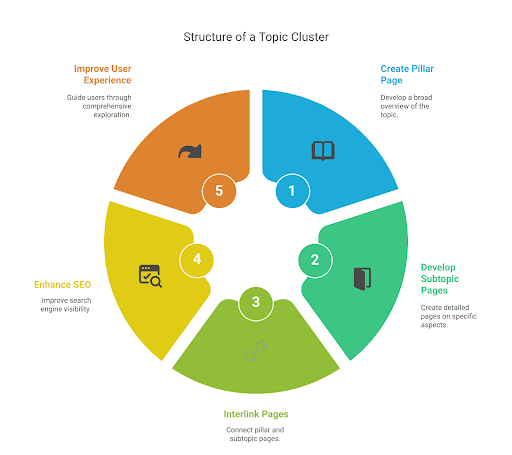
Q10. What Are Topic Clusters? How Do You Create One?
Topic clusters are an SEO content strategy where a central “pillar” page covers a broad topic, and multiple supporting “cluster” pages dive into specific subtopics, all interlinked. This structure helps search engines understand your site’s content hierarchy and boosts rankings by improving topical authority.
To create one, choose a core topic for the pillar page, research related keywords for subtopics, and develop detailed cluster content. Ensure each cluster page links to the pillar and vice versa, using consistent internal linking to enhance user navigation and strengthen your overall SEO strategy.
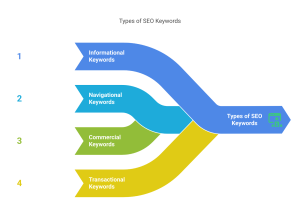
Q11. What are the different types of keywords in SEO?
In SEO, keywords are categorized based on their intent and length. Short-tail keywords are broad and high-volume (e.g., “shoes”), while long-tail keywords are more specific and lower competition (e.g., “best running shoes for flat feet”).
Branded keywords include company names, whereas non-branded keywords focus on generic terms. Transactional keywords show buying intent, while informational keywords indicate a search for knowledge.
Other types include navigational, geo-targeted, and LSI (Latent Semantic Indexing) keywords, all playing unique roles in attracting targeted traffic and improving search visibility.
Q12. What is the difference between long-tail vs short-tail keywords?
Long-tail and short-tail keywords differ in length, search volume, user intent, and competition—each serving unique SEO goals.
Feature
Short-Tail Keywords
Long-Tail Keywords
Length
1-2 words
3 or more words
Search Volume
High
Low to moderate
Competition
Very high
Lower
Specificity
Broad and general
Highly specific
Conversion Rate
Lower
Higher
Cost in Paid Ads (CPC)
Higher
Lower
Example
“shoes”
“best running shoes for flat feet women”
SEO Difficulty
Harder to rank
Easier to rank
User Intent
Less clear (could be browsing)
Clearer (more purchase or information intent)
Advanced Technical SEO Interview Questions & Answers
Q1- What is Schema Markup, and How Does Structured Data Improve SEO?
Schema markup is a type of structured data or specialized code that helps search engines understand the content on your website. Adding Schema markup to your website provides search engines with more context about your content, such as product information, event details, or article authorship. This can lead to richer search results, known as rich snippets, which can increase click-through rates and improve your website’s visibility.
Q2- What Are Key Considerations for International SEO?
International SEO involves optimizing your website to attract traffic from different countries and languages by addressing several key factors. Implementing hreflang tags helps signal search engines about the language change.
Content localization is equally important as it ensures your information is relevant to local languages, cultures, and preferences. Choosing an appropriate domain strategy, such as country-code top-level domains (ccTLDs), subdomains, or subdirectories, also plays a significant role in organizing country-specific content.
Q3- Why is HTTPS Important for Website Security and SEO?
HTTPS (Hypertext Transfer Protocol Secure) is a secure protocol that encrypts data transmitted between a website and visitors. It not only protects your users’ data but also signals to search engines that your website is trustworthy and secure. Google has indicated that HTTPS is a ranking signal, so having a secure website can improve your search engine rankings.
Q4- What is JavaScript SEO optimization, and why is it important?
JavaScript SEO optimization ensures search engines can crawl and index JavaScript-generated content on a website. Strategies like server-side rendering, pre-rendering, and dynamic rendering make the content accessible to search engines. By optimizing JavaScript SEO, one can ensure that search engines can see and index their website’s dynamic features, enhancing visibility and organic traffic. For those managing e-commerce sites, integrating these techniques with JavaScript SEO services can further boost site performance and search engine rankings. For those managing e-commerce sites, integrating these techniques with JavaScript SEO strategies can further boost site performance and search engine rankings.
However, there are challenges associated with JavaScript SEO. To learn more about common JavaScript SEO issues and how to address them, visit our guide on JavaScript SEO Issues
Q5- How Do Site Migrations and Redirects Impact SEO?
Site migrations and redirects can significantly impact your SEO if not handled correctly. Creating a comprehensive redirect strategy is important to ensure that your old pages redirect to the corresponding new pages. This helps preserve your existing search engine rankings and prevents broken links.
Q6. How is technical SEO changing with AI search (AEO and GEO)?
As answers increasingly surface inside AI Overviews and large language models, technical SEO is expanding from “can Google crawl and index this?” to “can AI systems retrieve, parse and cite this?”. The fundamentals still apply – clean crawlability, fast rendering, structured data – but a few areas gain weight.
Strong answers mention: robust structured data and clear semantic HTML so machines can extract entities and facts; well-formed, chunked content that’s easy to quote; ensuring critical content isn’t locked behind JavaScript that LLM crawlers may not render; managing access for AI crawlers (e.g. GPTBot, Google-Extended) in robots.txt as a business decision; and monitoring brand visibility inside AI answers, not just blue links. This is the shift from SEO to AEO (Answer Engine Optimisation) and GEO (Generative Engine Optimisation).
SEO Manager Technical SEO Interview Questions
Q1 – How do Google’s Core Web Vitals impact SEO rankings, and how would you optimize for them?
Google’s Core Web Vitals (CWV) are a set of metrics that measure the user experience on a web page. These metrics directly impact your website’s search engine rankings. A good user experience means your website loads quickly, is responsive, and doesn’t have unexpected layout shifts.
To optimize for CWV, focus on improving page load speed, reducing layout shifts, and ensuring a responsive user experience. Some strategies include minimizing file sizes, optimizing images, utilizing browser caching, reducing HTTP requests, and avoiding excessive JavaScript. Tools like Google PageSpeed Insights, GTmetrix, and Lighthouse can help you diagnose performance issues and identify areas for improvement.
Q2 – What strategies do you use to optimize page speed, and what tools do you rely on for diagnosis?
Optimizing page speed is important for both user experience and SEO. Some effective strategies to optimize the page load speed of your website include:
Reducing file sizes: Compress images, minify CSS and JavaScript, and optimize code for efficiency.
Minimize HTTP requests: Combine files, use CSS sprites, and utilize browser caching.
Utilizing browser caching: Enable caching for static assets like images, CSS, and JavaScript to reduce server load and improve load times.
Optimizing images: Use appropriate image formats (JPEG, PNG, WebP), resize images to fit your website’s dimensions, and consider lazy loading for images below the fold.
Google PageSpeed Insights can help you diagnose performance issues, measure your website’s speed, and identify specific areas for improvement.
Q3- What is your process for identifying and resolving technical SEO issues using log file analysis?
Log file analysis is a valuable technique for identifying and resolving technical SEO issues. By examining your web server’s logs, you can gain insights into user behaviour, crawl errors, and other technical problems.
Here’s a typical process for using log file analysis:
Gather and organize your log files: Collect your web server logs from a specified period and ensure they are in a readable format.
Analyse log file data: Use Google Search Console or specialized log analysis software to analyze the data and identify patterns, errors, or anomalies.
Identify technical SEO issues: Look for common issues like broken links, crawl errors, redirects, and slow page load times.
Resolve identified issues: Implement necessary fixes, such as creating redirects, fixing broken links, and optimizing page performance.
Monitor and iterate: Continuously monitor your website’s log files to identify new issues and make ongoing improvements.
Q4- What are hreflang tags, and how would you implement them on a multilingual website?
Hreflang tags are used to indicate the language and target country of a web page. They help search engines understand the relationship between different language versions of your website, ensuring that users are shown the most relevant content based on their location and language preferences.
To implement hreflang tags on a multilingual website, you’ll need to add them to the <head> section of each page. The tags should include the language code (e.g., “en” for English) and the target country code (e.g., “US” for the United States). For example:
HTML <link rel=”alternate” hreflang=”en-us” href=”https://www.example.com/en-us/page.html” />
Q5- What is your strategy for handling broken links, 404 errors, and soft 404s on a website?
Broken links, 404 errors, and soft 404s can negatively impact user experience and search engine rankings. Here’s a strategy for handling these issues:
Regularly crawl your website: Use tools like Google Search Console or Screaming Frog to identify broken links and 404 errors.
Create 301 redirects: For pages that have been moved, implement 301 redirects to guide users and search engines to the new location.
Create informative 404 pages: Your 404 pages should provide helpful content, such as a search bar or suggestions for related content.
Use a sitemap: Submit a sitemap to search engines to help them discover and index your website’s content, including any new or updated pages.
Monitor for soft 404s: Soft 404s are pages that return a 200 status code but are not relevant or useful to users. Use tools to identify soft 404s and improve your website’s structure and content.
Technical SEO Interview Questions for Experienced Professionals (3–5 Years)
Q1. Walk us through how you’d diagnose a sudden 40% drop in organic traffic.
Start by confirming it’s real (not analytics/tracking) and isolating the scope — sitewide or a section, all devices or one, which templates and queries. Check for a Google algorithm update, manual actions or security issues in Search Console, recent site changes or migrations, indexing coverage, robots.txt/noindex accidents, and Core Web Vitals or server issues. The interviewer wants a structured, hypothesis-driven process, not a single guess.
Q2. How do you prioritise technical fixes when you have hundreds of crawl errors?
Prioritise by impact and effort: focus on issues affecting indexable, revenue-driving templates and high-traffic URLs first; group errors by root cause (one template fix can clear thousands of URLs); and weigh quick wins against engineering cost. Reference data – Search Console, log files, crawl tools – to justify the order rather than fixing errors in the order a tool lists them.
Q3. Describe a technical SEO project where you measurably improved performance.
This is your STAR-method moment: Situation, Task, Action, Result. Pick one project (e.g. fixing render-blocking JS, an indexation cleanup, or a migration) and quantify the outcome – crawl efficiency, indexed pages, rankings, or organic sessions. Experienced interviewers care most about the measurable result and your reasoning.
Q4. How would you approach a large-scale site migration without losing rankings?
Cover the lifecycle: full pre-migration crawl and benchmark, a complete URL-to-URL 301 redirect map, preserving titles/metadata/structured data, staging-environment QA, updating internal links and sitemaps, and post-launch monitoring of indexation, redirects and rankings. Emphasise planning and a rollback plan – migrations are where senior candidates prove their judgement.
SEO Executive & Specialist Interview Questions
Q1. What does a typical day look like for an SEO executive?
A practical answer covers a mix of monitoring (rankings, traffic, Search Console errors), execution (on-page optimisation, content briefs, internal linking, fixing technical flags), analysis (keyword research, competitor checks, reporting), and coordination with content and development teams. It shows you understand the role is part analysis, part execution, part communication.
Q2. Which SEO tools do you use day to day, and for what?
Name tools and tie each to a job: Google Search Console and Analytics (performance and indexing), Ahrefs or SEMrush (keywords, backlinks, competitors), Screaming Frog (technical crawls), and PageSpeed Insights or Lighthouse (Core Web Vitals). Specialists are expected to explain why and when they use each, not just list names.
Q3. How do you do keyword research for a new page?
Outline the process: understand the business goal and audience, seed keywords, expand with tools and SERP/competitor analysis, then cluster by search intent and map keywords to the right page. Balance search volume, difficulty and relevance, and prioritise intent over raw volume.
Q4. How do you measure the success of an SEO campaign?
Go beyond rankings: organic sessions and their trend, keyword visibility, click-through rate, conversions and assisted conversions, indexation health and Core Web Vitals, and increasingly in 2026 visibility in AI Overviews. Strong candidates tie metrics back to business outcomes like leads or revenue.
Tips to Prepare for Technical SEO Interview
Landing an SEO job requires more than just knowing keywords and analytics. Whether you’re aiming for a junior or senior SEO role, interviewers look for your technical skills, problem-solving abilities, and real-world experience. Proper preparation can boost your confidence and help you stand out.
Brush Up on SEO Basics – Understand how search engines work, the difference between on-page, off-page, and technical SEO, and key ranking factors.
Stay Updated with SEO Trends – Follow industry blogs like Search Engine Journal, Moz, and Google Search Central to stay current.
Practice Technical SEO Concepts – Review important technical SEO concepts such as site architecture, crawl budget, schema markup, robots.txt, canonical tags, and Core Web Vitals. Understanding how to address common technical SEO issues—like indexing errors, duplicate content, and slow page speed—will give you a significant edge.
Review SEO Tools – Be familiar with Google Search Console, SEMrush, Ahrefs, Screaming Frog, and other top seo tools commonly used by SEO professionals.
Prepare Case Studies or Past Projects – Show how your efforts led to measurable improvements in traffic, rankings, or conversions.
Understand Data and Reporting – Practice reading and interpreting data from Google Analytics and Search Console to communicate insights clearly.
Know the Business Impact – Be ready to explain how SEO supports broader marketing goals and ROI.
Practice Common SEO Interview Questions – Get comfortable with both technical and scenario-based questions, especially those related to troubleshooting and solving common technical SEO issues.
Conclusion
By understanding technical SEO concepts and terminology, practicing problem-solving skills, and staying updated with industry trends, people can demonstrate their expertise and readiness in Technical SEO. It is not a static field but is an ongoing learning and exploration of new concepts and techniques that are essential to stay ahead in the SEO landscape. By continually expanding their knowledge and honing their skills, SEO professionals can effectively optimize websites, improve search engine visibility, and drive organic traffic.
Partner with us today and leverage our specialized technical SEO services to achieve even greater online success.
Frequently Asked Questions
How should a fresher prepare for a technical SEO interview?
Master the fundamentals first – how search engines crawl, render and index, plus on-page basics. Then learn the core technical terms (robots.txt, canonical tags, sitemaps, Core Web Vitals) and practise explaining each in plain English with a real example.
What's the difference between an SEO and a technical SEO interview?
A general SEO interview spans on-page, off-page, content and strategy. A technical SEO interview focuses on how a site is built and served – crawlability, indexation, site speed, structured data, JavaScript rendering and migrations.
How many questions should I prepare for a technical SEO interview?
Aim to be comfortable with 30–50 questions across basics, advanced and scenario-based topics. Depth matters more than count – be ready to explain the “why” and give examples.
Are technical SEO interviews changing because of AI search?
Yes. Alongside classic technical SEO, interviewers increasingly ask about structured data, content that LLMs can retrieve and cite, managing AI crawlers, and AEO/GEO – optimising for answer and generative engines.
Sarvesh Bagla is an enterprise SEO expert and industry leader who has driven transformational digital growth for India’s top brands across the BFSI, Healthcare, Automotive, and ECommerce industries. As the Founder and CEO of Techmagnate, he leads large-scale organic search strategies and performance marketing campaigns for businesses looking to succeed in today’s AI-driven search landscape.
A strong advocate for thought leadership, Sarvesh is deeply involved in SEO evangelism and regularly contributes to industry discussions through LinkedIn, webinars, and CMO roundtables. His focus today is on helping brands prepare for an AI-first SEO future (AEO, GEO) and strategies for Large Language Models (LLMs) at the core.
Get the most valuable search related insights about leading brands, trending keywords, search volumes, fastest growing categories, city-level insights and much more!
It has come to our notice that fraudulent job offers are being circulated on the internet through messaging apps like WhatsApp and Telegram, which falsely claim to be from Techmagnate. We take this matter seriously and would like to caution all candidates to be wary of such postings.
Please Note That –
We do not charge any fees/security deposit/payment from candidates, irrespective of the professional experience they hold, for job applications or interviews
Official communication channels include our website and verified social media accounts, primarily LinkedIn.
Kindly double-check the domain name – @techmagnate.com – in the email address
We follow a transparent and ethical approach for hiring/onboarding supported by proper documentation.
Ensure that you only apply through verified channels to avoid being scammed. We also recommend that you exercise caution when sharing personal information or financial details with any job posting or recruitment agencies claiming to represent us.
We want to ensure that potential candidates interested in joining Techmagnate have a safe and positive experience.
If you find that someone that fits the description above has reached out to you, please notify us immediately at jobs@techmagnate.com.
Team @Techmangate
Build a Better Digital Marketing Strategy with Techmagnate’s Search Trends Reports
 Important Alert: