Beware of fake job offers and payment requests. We only use official email IDs and never conduct interviews on messaging apps.Beware of fake job offers and payment requests. We only use official email IDs and never conduct interviews on messaging apps.
Summary – Fixing the “Crawled – Currently Not Indexed” issue is critical to increasing your website’s visibility on Google. When your pages aren’t indexed, they don’t appear in search results, resulting in no traffic and missed engagement opportunities. By resolving this issue, you ensure that your content is easy to find, allowing you to attract more visitors and meet your business objectives. It is an important step toward increasing your website’s online success.
Key Takeaways:-
When Google shows “crawled – currently not indexed,” it means that your page has been discovered but is not yet in the index.
You can find these pages by searching manually or using Google Search Console. Fix by focusing on original content, keeping the site clean, and avoiding duplication.
Take necessary actions like improving internal linking and site structure, avoiding duplicate content, proofreading, and increasing content quality.
Handling the “crawled – currently not indexed” issue in Google Search Console is similar to planning an amazing party, only to learn that no one showed up for the invitations. Your efforts go unrewarded since Google has not yet included your well-written and audience-ready content in its search index.
This repeating issue can be inconvenient, but it can be resolved with the appropriate strategy. Understanding the core issues and employing focused methods can ensure that your content receives the attention it deserves.
Discover What Your Customers Search ForDiscover What Your Customers Search For
Get insights on evolving customer behaviour, high volume keywords, search trends, and more.
When your webpage says “crawled – currently not indexed” in Google Search Console, it means Google saw it but decided not to include it in search results. This does not always imply a mistake; it could indicate issues such as duplicate content, poor site structure, or Google deeming the page insufficiently valuable for users.
There are various causes for this status. Google may believe that the content isn’t sufficiently relevant or unique about the other pages it indexes. Poor content quality or an excessive amount of advertisements may also be contributing factors. Furthermore, it could be challenging for Google to index the page if the website has a disorganized structure or duplicate content.
How Do You Find “crawled – currently not indexed” Pages?
Search engines, such as Google, find and index pages to display in search results when they crawl websites. Pages that have been crawled but not yet indexed occasionally do not show up in search results. Here’s how you can find them:
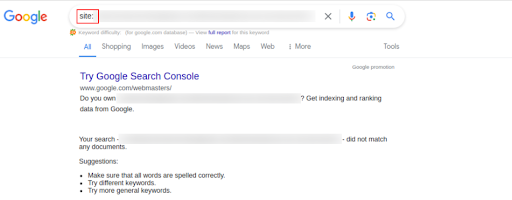
Employ Google’s search operator “site:” followed by your website URL (e.g., site.com). This provides a list of all pages from your site that Google has indexed. If specific pages that you know exist are missing from this search, they may be in the “Crawled – currently not indexed” state.
Manual Verification
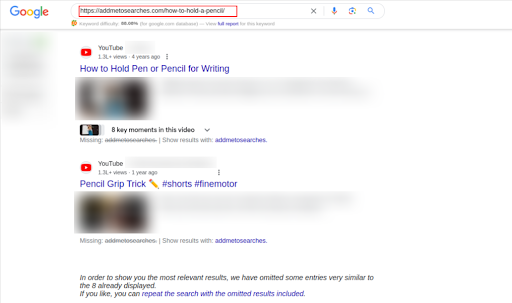
Sometimes you may find out if a page is indexed by manually searching Google with the URL of that specific page. The page is probably in the crawled but not indexed category if it is not listed in the search results.
To guarantee that your pages get indexed quickly, make sure they contain original, high-quality information, are mobile-friendly, and easily accessible to Google’s crawlers. Internal links can also help Google discover and index content more quickly.
Reasons Behind “Crawled – currently not indexed” Issue
Several factors could explain why a page isn’t indexed by Google. Some of the most prominent ones include:
Quality and Relevance
Google prioritizes pages that provide high value and relevance to users. Content that is too thin or irrelevant may be excluded.
Duplicate Content
To give users a more helpful search experience, Google avoids indexing pages that are very similar to one another on the same site.
Site Architecture Issues
Websites need to have internal linkage and clear navigation to be effectively indexable. Conducting a comprehensive website audit can reveal any site architecture issues that may be preventing proper indexing.
Technical Barriers
Indexing may be prevented by mistakes in robots.txt files, noindex tags, or broken redirects.
Temporary Fluctuations
A page may be momentarily unindexed as a result of Google’s recent algorithm updates or system delays. Tools like the URL Inspection Tool might provide more appropriate insights.
6 Ways To Fix “Crawled – currently not indexed” Issue In GSC
When it comes down to fixing crawled – currently not indexed issues, the options are varied. However, the key steps include:
1. Provide relevant and helpful content
Content issues frequently result in the “crawled – currently not indexed” notification. Make sure your pages meet the requirements by concentrating on offering high-quality content pertinent to user intent.
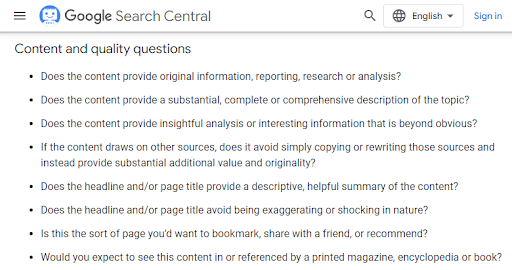
You can assess the value of your content by using the questions that Google Search Central offers. Google’s Quality Raters Guidelines may offer guidance on how to make your website better, even though they are intended primarily for Search Quality Raters.
It’s also crucial to optimize content created by users. For instance, if Google searches a forum and discovers no insightful responses, the page can be rated as low-quality.
2. Review the affected pages manually
Before attempting to resolve the “Crawled – currently not indexed”, ensure that your pages are free of common errors such as incorrect canonical tags, blocked indexing, and server errors.
You can use GSC to monitor your index coverage. Once you’ve resolved any issues, submit the impacted URLs again for a search engine to crawl and expedite the reindexing process.
3. Enhance your website structure and improve internal linking
The site structure may be the cause if your pages are stuck in the “crawled – currently not indexed” report. Search engine bots will find and comprehend your content more easily on a well-structured website, increasing the likelihood that it will be indexed.
Make sure every page has a clear structure and internal links to improve indexing. Consider an excellent page that is only reachable via the sitemap. If there are no internal links, Google may give other pages priority when indexing this page.
Google might still crawl the page, but it might not give it as much weight if there are no internal links. If there is insufficient semantic or structural information, other pages may be given priority for indexing.
4. Avoid duplicacy of content
Duplicate content can be a problem for SEO, as search engines like Google value unique and high-quality content. If your pages are too similar or identical, Google may choose to index only one of them, affecting your visibility in search results.
To address excessive duplicate content, consider the following:
Canonical tags
These HTML tags inform search engines about the original versions.
Internal links
Make sure internal links point to the original content because Google may use them to gauge how important a page is.
XML Sitemaps
Include only the canonical version in your sitemap.
5. Submit a request to Google to re-crawl specific URLs
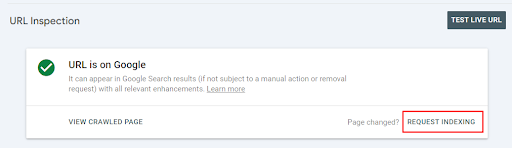
Using Google’s URL Inspection tool, you can resubmit your pages for indexing. To start indexing a page, simply enter its URL and click “Request Indexing.”
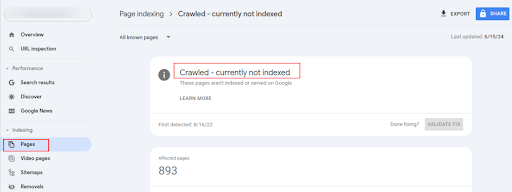
Another option is to open Google Search Console’s Indexing section, then go to Pages and select “Crawled – Currently Not Indexed.” Select “All known pages” and then click “Validate Fix.”
The whole process helps Google recognize and index your pages so that they show up in search results. Please be patient once you submit your request, as indexing times can vary.
6. Add temporary sitemap.xml to the site
You can easily create a temporary sitemap to help Google index your newly redirected URLs more quickly. All of these URLs would be included, and Google Search Console would receive them.
Here’s how you can create a temporary sitemap.xml file:
Extract URLs
From the “Crawled – Currently Not Indexed” report, extract all the URLs.
Match with redirects
Match these URLs with their corresponding redirects to ensure the sitemap contains the final destination URLs.
Generate sitemap
Use a tool like XML Sitemaps to generate a sitemap containing the matched URLs.
Upload to GSC
Upload the generated sitemap to your Google Search Console dashboard to notify Google of the new URLs.
Crawled – Currently not indexed” vs. “Discovered – currently not indexed”
Crawled but not indexed indicates that Google accessed the page but has yet to add it to the index. In contrast, ‘Discovered – Currently Not Indexed’ indicates that Google is aware of the page but has yet to visit it.
These statuses indicate that the page is not included in Google’s index, possibly due to low-quality content or internal linking issues. To use “Discovered,” you must first understand why Google has not yet visited the page, which could be due to server issues, crawl budget limitations, or overall website quality.
Take the Next Step With SEO Experts
The process of moving from “Crawled – Currently Not Indexed” to “Indexed” is complex and calls for an effective strategy. You can raise the possibility that your website will appear in search engine results by enhancing the quality of the content, optimizing technical aspects, and following Google’s guidelines.
At Techmagnate, we can help you successfully navigate Google’s indexing algorithms. This makes sure that your content is indexed and appears high in search results.
Our technical SEO experts can optimize your content and boost your online presence organically. Call us today!
Frequently Asked Questions (FAQs)
How long does it take for Google to index my page after fixing the issue?
Once you resolve the “Crawled – Currently Not Indexed” issue and request indexing, it can take anywhere from a few hours to several days for Google to index your page.
Is the “Crawled – Currently Not Indexed” issue permanent if not fixed?
No, it’s not permanent. By addressing the underlying issues—such as content quality, technical SEO, or internal linking—you can ensure proper indexing over time.
Why is the page crawled currently not indexed?
There are several possible explanations, such as low-quality or duplicate content, or the page being too new. Technical issues such as robots.txt and meta tags that prevent indexing could also occur.
Sarvesh Bagla is an enterprise SEO expert and industry leader who has driven transformational digital growth for India’s top brands across the BFSI, Healthcare, Automotive, and ECommerce industries. As the Founder and CEO of Techmagnate, he leads large-scale organic search strategies and performance marketing campaigns for businesses looking to succeed in today’s AI-driven search landscape.
A strong advocate for thought leadership, Sarvesh is deeply involved in SEO evangelism and regularly contributes to industry discussions through LinkedIn, webinars, and CMO roundtables. His focus today is on helping brands prepare for an AI-first SEO future (AEO, GEO) and strategies for Large Language Models (LLMs) at the core.
Get the most valuable search related insights about leading brands, trending keywords, search volumes, fastest growing categories, city-level insights and much more!
It has come to our notice that fraudulent job offers are being circulated on the internet through messaging apps like WhatsApp and Telegram, which falsely claim to be from Techmagnate. We take this matter seriously and would like to caution all candidates to be wary of such postings.
Please Note That –
We do not charge any fees/security deposit/payment from candidates, irrespective of the professional experience they hold, for job applications or interviews
Official communication channels include our website and verified social media accounts, primarily LinkedIn.
Kindly double-check the domain name – @techmagnate.com – in the email address
We follow a transparent and ethical approach for hiring/onboarding supported by proper documentation.
Ensure that you only apply through verified channels to avoid being scammed. We also recommend that you exercise caution when sharing personal information or financial details with any job posting or recruitment agencies claiming to represent us.
We want to ensure that potential candidates interested in joining Techmagnate have a safe and positive experience.
If you find that someone that fits the description above has reached out to you, please notify us immediately at jobs@techmagnate.com.
Team @Techmangate
Build a Better Digital Marketing Strategy with Techmagnate’s Search Trends Reports
 Important Alert: