Beware of fake job offers and payment requests. We only use official email IDs and never conduct interviews on messaging apps.Beware of fake job offers and payment requests. We only use official email IDs and never conduct interviews on messaging apps.
What has been updated from the old blog post: In-depth guide to Google’s real-time location sharing feature and how to tackle technical issues of the same.
Summary: This extensive guide explores Google Maps’ real-time location-sharing feature, covering its evolution from Google+ to Google Maps, a step-by-step guide on how to use it, potential issues that may disrupt location sharing, and alternative platforms like WhatsApp, Samsung’s SmartThings, Apple’s “Find Me,” and Telegram. The guide also addresses reasons for Google Maps location-sharing problems, including technical glitches, privacy settings, and app compatibility.
We live in a digital age where staying connected is more critical than ever. Whether you’re running late to meet friends for dinner, heading out on a first date, or embarking on an epic cross-country road trip, the ability to share your real-time location can be a game-changer.
Google Maps, the trusty navigation companion for many, promises this feature, allowing you to share your location with loved ones, be it temporarily or continuously. It sounds fantastic, but it’s not uncommon to encounter situations where Google Maps doesn’t quite deliver on this promise.
In this comprehensive guide, we’ll explore the ins and outs of Google Maps’ real-time location-sharing feature. We’ll dive into its evolution, provide a step-by-step guide on how to use it, investigate potential issues that might disrupt your real-time location sharing, and even introduce you to alternative location-sharing platforms that come to the rescue when Google Maps falters.
Table of Contents
The Evolution of Location Sharing
A. The Transition from Google+ to Google Maps
In the not-so-distant past, the ability to share your location in real time was synonymous with Google+, a now-defunct social network. However, times have changed, and Google has transferred this invaluable feature to Google Maps, making it accessible to a broader audience.
B. No Location History Required: Google Maps Simplifies the Process
Unlike its predecessor, Google Maps doesn’t require you to enable location history for location sharing. This streamlines the process, ensuring you can share your real-time location without delving into complex settings.
C. The Promise of Seamless Real-Time Location Sharing
The essence of real-time location sharing is simplicity. Google Maps has embraced this principle, making it easy for users to connect and stay informed about each other’s whereabouts.
Discover What Your Customers Search ForDiscover What Your Customers Search For
Get insights on evolving customer behaviour, high volume keywords, search trends, and more.
How to Share Your Real-Time Location on Google Maps
Step-by-Step Guide to Sharing Your Location
Sharing your real-time location or location sharing via Google Maps is easier than you might think. This step-by-step guide takes you through the process, ensuring you get it right every time.
1. Accessing Google Maps on Android and iOS
To initiate real-time location sharing, you need to access Google Maps on your Android or iOS device. Open the app, and let’s get started.
2. Initiating Location Sharing
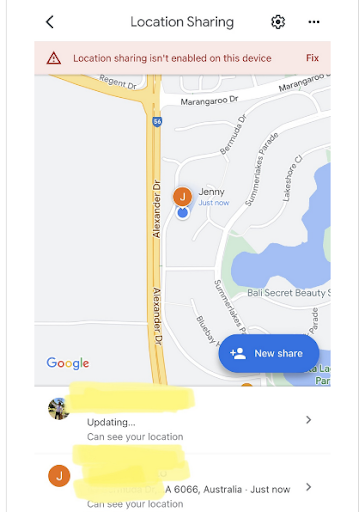
Inside the Google Maps app, tap your profile picture or initial, and navigate to the “Location sharing” option.
3. Setting the Sharing Duration
Decide how long you want to share your location. Google Maps allows you to choose a duration ranging from 15 minutes to a full day. You can even select “Until you turn this off” for continuous sharing.
4. Choosing Recipients
Select the people with whom you want to share your location. You can either choose from your Google contacts or enter their name, phone number, or email address manually.
5. Ensuring Location Access
It’s vital to allow Google Maps to always access your location for real-time sharing. This is a critical step to ensure the feature works seamlessly.
6. Sharing with Non-Google Account Holders
What if your recipient doesn’t have a Google account? No worries. You can create a link and share it via email, SMS, WhatsApp, Twitter, or any other compatible instant messenger. Anyone with this link can track your real-time location for the chosen duration, up to 24 hours.
7. Maintaining Control: Revoking Location Sharing
Control is in your hands. You can revoke location sharing at any time, ensuring your privacy and control remain paramount.
Real-Time Location Sharing on WhatsApp
Google Maps isn’t the only player in the real-time location-sharing arena. WhatsApp offers a similar feature, allowing you to share your real-time location with friends and family within a chat window. The process is straightforward:
1. Sharing Within a Chat Window
In a WhatsApp chat window, click on the paperclip icon, usually used for sending attachments. Here, you’ll find the location icon in green.
2. Offering Options for Duration
WhatsApp takes the convenience a step further. You can choose to share your location for as little as 15 minutes or extend it up to 8 hours, providing flexibility for various scenarios.
3. Retaining Control on WhatsApp
Just like Google Maps, WhatsApp ensures that you can maintain control over your real-time location sharing. You have the power to stop sharing whenever you wish.
Possible Reasons for Google Maps Location Sharing Issues
A. Technical Glitches
Even the most reliable apps can run into technical hiccups. Google Maps is no exception. It’s essential to be aware of potential glitches that might disrupt your location sharing.
1. App or Device-Related Problems
Sometimes, it’s not Google Maps itself but your device or the app that’s causing the issue. We’ll explore how to troubleshoot such problems.
Example: Suppose you’re using an older Android device, and the Google Maps app hasn’t been updated in a while. In such cases, outdated app versions can lead to technical glitches. We recommend ensuring you have the latest version of Google Maps installed.
2. Connectivity Concerns
In our increasingly connected world, network issues can thwart your best-laid plans. We’ll guide you through how to tackle these obstacles.
Example: Imagine you’re on a road trip through rural areas with limited network coverage. Even the most advanced apps struggle to maintain real-time location sharing in such conditions. It’s important to be aware of the limitations of network connectivity in remote areas and plan accordingly.
B. Privacy Settings and Permissions
Location sharing depends on the correct app permissions and privacy settings. We’ll delve into these aspects to ensure they don’t stand in your way.
You may not have granted the necessary permissions to Google Maps. We’ll show you how to check and adjust these settings.
Example: Let’s say you’ve accidentally denied location access to Google Maps while navigating the app’s settings. In such cases, it’s crucial to revisit your app permissions and grant the necessary access to ensure real-time location-sharing functions smoothly.
2. Location History Settings
Even though Google Maps doesn’t require location history, its settings can still affect real-time sharing. We’ll uncover how to manage these settings for a smooth experience.
Example: Consider a scenario where you’ve inadvertently disabled location history within Google Maps. Although Google Maps doesn’t need it for location links, the app might still interpret this as a privacy setting and restrict your sharing. It’s crucial to understand the settings and ensure they align with your preferences.
C. Incompatibility with Google Maps Go App
If you’re using the Google Maps Go app, you might encounter some limitations. We’ll shed light on this potential issue and explore workarounds if you’re facing it.
Example: Suppose you’re using a budget-friendly Android Go smartphone, which often comes pre-installed with the lightweight Google Maps Go app. While this version offers excellent performance on low-end devices, it may lack some advanced features found in the full-fledged Google Maps app. To overcome this limitation, you can consider switching to the regular Google Maps app for comprehensive real-time location sharing.
Alternative Location Sharing Platforms
A. Samsung’s SmartThings App
Samsung offers its SmartThings app, providing an alternative for sharing your location in real time. We’ll walk you through how to utilize this option.
Example: If you’re in a household where family members use both Android and iOS devices, Samsung’s SmartThings app can serve as a unifying platform for real-time location sharing. It’s especially useful if you want to share your location with family members who use different types of smartphones. Additionally, optimizing your location page SEO can help ensure your location-sharing information is easily accessible for users searching for specific features on your website.
B. Apple’s “Find Me” Function
Apple’s “Find Me” function provides seamless location sharing for iOS users. We’ll detail how to make the most of this feature.
Example: Suppose you’re an iPhone user sharing your location with a friend who also uses an iPhone. Apple’s “Find Me” function ensures a smooth, integrated experience. It allows you to share your real-time location through the Apple ecosystem, providing a hassle-free solution for iOS users.
C. Telegram: A Unique Solution for Limited-Time Location Sharing
Telegram, the versatile messenger app, allows you to share your smartphone’s location for a limited time. We’ll explore this unique solution and guide you on using it.
Example: Let’s say you’re planning to meet someone for a brief coffee catch-up, and you want to share your location for just 30 minutes. Telegram’s limited-time location-sharing feature is ideal for such situations, offering precise control and flexibility in sharing your real-time whereabouts.
D. Assessing Other Options: Pros and Cons
We’ll wrap up by comparing these alternative platforms, weighing their pros and cons, and helping you choose the one that suits your needs.
Consider a scenario where you’re organizing a family reunion. You want to ensure everyone can share their location links and stay connected throughout the event. Comparing the pros and cons of different platforms can help you make an informed decision on which one best serves your family’s unique needs.
Navigating the Journey of Real-Time Location Sharing
To sum it up, sharing real-time location is your secret weapon for staying connected in today’s fast-paced world. It’s like having a superpower that can ease out your everyday scenarios. Implementing a local SEO checklist strategy can also ensure your business’s location-based visibility remains strong, which complements the convenience of real-time location sharing for personal and professional use.
But, hey, even superheroes face challenges, right?
We’ve shed light on how to tackle the quirks of Google Maps to ensure your location-sharing journey goes smoothly. What’s more, we’ve emphasized the importance of giving you the reins in this digital age, making sure your privacy is never compromised. So, from unraveling the initial mystery to mastering the art of location sharing, you’ve got this! It’s not a riddle; it’s a nifty tool in your digital toolkit that can make life a whole lot easier.
Discover More About Real-Time Locations! Contact Us Now for Expert Guidance. – Techmagnate
Neha Bawa is the Director of Brand Marketing at Techmagnate. She has worked in Digital Marketing since 2012 and has specialised in content creation. She has earned a Master’s degree in Interactive Communications from Quinnipiac University in Connecticut, U.S.A. Her interests lie in creating great content, docs, and working towards sustainability through biodiversity.
Get the most valuable search related insights about leading brands, trending keywords, search volumes, fastest growing categories, city-level insights and much more!
It has come to our notice that fraudulent job offers are being circulated on the internet through messaging apps like WhatsApp and Telegram, which falsely claim to be from Techmagnate. We take this matter seriously and would like to caution all candidates to be wary of such postings.
Please Note That –
We do not charge any fees/security deposit/payment from candidates, irrespective of the professional experience they hold, for job applications or interviews
Official communication channels include our website and verified social media accounts, primarily LinkedIn.
Kindly double-check the domain name – @techmagnate.com – in the email address
We follow a transparent and ethical approach for hiring/onboarding supported by proper documentation.
Ensure that you only apply through verified channels to avoid being scammed. We also recommend that you exercise caution when sharing personal information or financial details with any job posting or recruitment agencies claiming to represent us.
We want to ensure that potential candidates interested in joining Techmagnate have a safe and positive experience.
If you find that someone that fits the description above has reached out to you, please notify us immediately at jobs@techmagnate.com.
 Important Alert:
 Important Alert: