Beware of fake job offers and payment requests. We only use official email IDs and never conduct interviews on messaging apps.Beware of fake job offers and payment requests. We only use official email IDs and never conduct interviews on messaging apps.
Summary: Understanding GA4 attribution models is key to identifying which marketing channels truly drive conversions. This guide breaks down each GA4 model, shows how to interpret attribution reports, avoid common mistakes, and use consulting services to improve CRO and campaign performance with data-backed decisions.
Key Takeaways:-
GA4 attribution assigns credit across touchpoints, offering a clearer view of the full customer journey.
Choosing the right attribution model impacts budget allocation and conversion insights.
GA4 offers six key attribution models, including Data-Driven, Last Click, and Time Decay.
Reports like Conversion Paths and Model Comparison help evaluate channel performance more accurately.
Misusing attribution models can lead to poor marketing decisions and undervalued campaigns.
We’re always trying to fine-tune our marketing efforts to drive more conversions. In the complex digital landscape where customers engage with brands across multiple touchpoints before converting, identifying what works in your marketing strategy can feel like solving a mystery. And this is where attribution in Google Analytics comes into play.
With Google Analytics 4 (GA4) leading the way, marketers can now access advanced marketing attribution tools that reveal how different channels contribute to success. To make the most of them, you must understand the GA4 conversion models, how they impact GA4 metrics, and how the right choice can level up your Conversion Rate Optimization (CRO) efforts.
Table of Contents
Tracing the Trail: What Attribution Means in Google Analytics
Attribution in Google Analytics refers to assigning credit to different touchpoints along a customer’s journey that led to a conversion. Whether someone found your site via a Google ad, returned through an email campaign, or clicked on a social post before buying, each step in that path can be tracked and evaluated.
GA4 attributes actions to users, allowing a more accurate understanding of how people move through your funnel. Imagine you’re selling high-end bicycles. A potential customer sees a YouTube ad (Awareness), clicks a Facebook ad the next day (Consideration), then finally converts after searching for your brand on Google (Decision). Which source gets the credit? It will depend on the attribution model you choose.
Discover What Your Customers Search ForDiscover What Your Customers Search For
Get insights on evolving customer behaviour, high volume keywords, search trends, and more.
The attribution model shapes your entire understanding of performance. It affects how you read key metrics, such as conversions, revenue, and engagement, and guides how you allocate your marketing budget. By integrating AI SEO metrics, you can gain more accurate insights, refine attribution models, and make smarter, data-driven decisions.
Choosing the wrong model means risking giving all the credit to the final touchpoint, say, a branded Google search, while undervaluing the channels that sparked interest in the first place. That could lead you to cut high-impact top-of-funnel efforts, such as social media or Responsive display ads, even though they were key in starting the customer journey.
Meet the Team: Types of GA4 Conversion Models
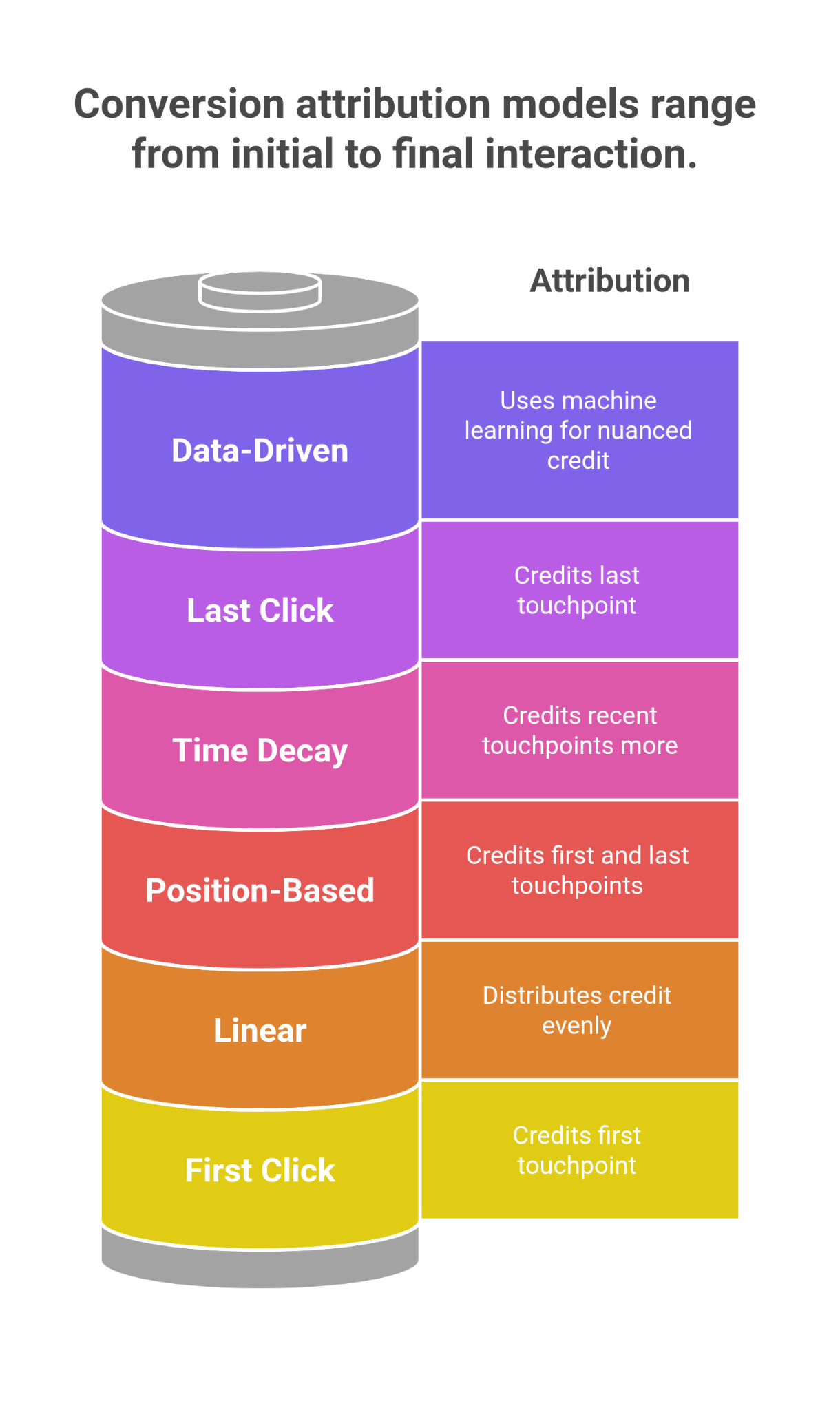
GA4 offers several conversion attribution models, allowing marketers to align with their marketing goals.
1. Cross-channel Data-Driven Attribution (Default in GA4)
How it works: It applies machine learning to look at your site’s real user behavior and determine which channels deserve conversion credit.
Considers: Device type, number of ad interactions, engagement order, and other behavioral signals.
Best for: A nuanced, AI-powered look at complex user journeys.
2. Last Click (Cross-channel)
How it works: Attributes 100% of the conversion credit to the final touchpoint, excluding direct traffic.
Best for: Simple funnels or when measuring the effectiveness of closing channels.
Caution: You risk underestimating the value of top and mid-funnel interactions that helped drive the conversion.
3. First Click (Cross-channel)
How it works: Gives full credit to the first channel interaction before the conversion.
Best for: Understanding what drives initial awareness or discovery.
4. Linear Attribution
How it works: Distributes credit evenly across all touchpoints that led to the conversion.
Best for: The campaigns that involve consistent engagement across multiple channels.
5. Position-Based Attribution (U-Shaped)
How it works: Assigns 40% of the credit to the first and last interactions, while the remaining 20% is evenly distributed across the touchpoints.
Best for: The introduction and closing channels are equally important in the conversion journey.
6. Time Decay Attribution
How it works: Assigns more credit to touchpoints that occurred closer to the conversion time.
Best for: When timing is critical, such as during flash sales, limited-time offers, or urgent promotions.
Behind the Numbers: Guide To Attribution Reports in GA4
GA4’s Attribution section is like a highlight reel for your marketing efforts; it shows who scored the winning goal, passed the ball, and set up the play. It’s easy to see how all your channels team up to drive conversions.
1. Conversion Paths Report
This report displays users’ actual sequences of interactions across various channels before conversion. It’s like watching a replay of how someone discovered your brand, returned through a few ads, and finally made a purchase. It matters as it helps you understand which combinations of channels are most effective and how long it typically takes users to convert.
2. Model Comparison Tool
This tool allows you to compare multiple GA4 conversion models side-by-side. For example, you can view how Last Click attribution differs from Data-Driven or Linear attribution for the same conversions.
Let’s say Facebook ads seem underwhelming under the Last Click model. However, when you switch to the Data-Driven model, you notice that Facebook gets more conversion credit. That suggests Facebook is likely playing a crucial role in the early or middle stages of the customer journey, indicating it deserves more attention and possibly a larger budget.
Crash-Proof Your Attribution: Common Mistakes to Skip
Choosing the wrong attribution model is like giving all the credit to the last person who shows up at a group project. Here are some common mistakes and how to avoid tripping over them:
1. Using only Last Click Attribution
Last Click gives 100% credit to the final interaction before a conversion. While simple, it often ignores the steps a user takes before converting. It can undervalue channels like social media, display ads, or email touchpoints that may have played a significant role earlier in the journey. A user first sees your Instagram ad, visits your site from a Google search a few days later, and finally buys after clicking a retargeting ad. Last Click gives full credit to the retargeting ad, ignoring Instagram and search, which helped bring the user in.
2. Ignoring Model Comparisons
Sticking to one attribution model without comparing it to others can give you a narrow view of what’s working. You may think a campaign isn’t performing well simply because your model doesn’t give it enough credit. Under the Last Click model, your YouTube campaign shows very few conversions. However, when you examine the Data-Driven model, it often initiates user journeys that ultimately lead to later conversions. Without comparing models, you might cut a campaign that’s helping.
3. Not Aligning Models with Business Goals
Campaigns have different goals, so your attribution model should match your strategy. If your goal is brand awareness, using Last Click or Data-Driven might not show the full value of top-of-funnel campaigns. A First Click model would better reflect which channels introduce new users to your brand.
Picking Your Player: Which Attribution Model Fits Best?
There’s no one-size-fits-all answer. The correct attribution model depends on your goals, sales cycle, and user behavior. Here’s a cheat sheet to help you out:
Goal
Suggested Model
Brand awareness
First Click
Conversion-focused campaigns
Last Click or Data-Driven
Balanced credit
Linear or Position-Based
Short-term promotions
Time Decay
Holistic insight
Data-Driven
Accomplish Your Mission
In the world of GA4, attribution is flexible and dynamic. When used correctly, it’s your best tool for unlocking actionable insights. By understanding and testing different GA4 conversion models, you can better align marketing strategies, improve GA4 metrics, and supercharge your Conversion Rate Optimization. And if you’re unsure where to start, our Google Analytics 4 consulting services can help you make sense of the data and turn it into measurable growth. So, the next time someone asks, “Which campaign drove the most sales?” you’ll be able to say, “Well, it’s complicated-but I’ve got the data to show exactly how.”
Frequently Asked Questions (FAQs)
What is attribution in Google Analytics 4 and why does it matter?
Attribution in GA4 assigns credit to different marketing touchpoints in a user's journey before conversion. It helps you understand which channels drive results and optimize budget accordingly.
Which GA4 attribution model should I use for brand awareness campaigns?
For awareness-focused campaigns, the First Click attribution model is most suitable as it gives full credit to the channel that initiated the user’s journey.
How does the GA4 data-driven attribution model work?
GA4’s Data-Driven model uses machine learning to evaluate actual user behavior and assign conversion credit based on how channels influence the outcome-not just the first or last click.
Can I compare multiple attribution models in GA4?
Yes. The Model Comparison tool in GA4 allows you to evaluate how different attribution models affect your metrics, helping you make informed decisions.
How do GA4 attribution reports improve conversion rate optimization?
By analyzing conversion paths and assigning proper credit to each touchpoint, GA4 reports uncover which channels and sequences lead to conversions-enabling smarter CRO strategies.
Neha Bawa is the Director of Brand Marketing at Techmagnate. She has worked in Digital Marketing since 2012 and has specialised in content creation. She has earned a Master’s degree in Interactive Communications from Quinnipiac University in Connecticut, U.S.A. Her interests lie in creating great content, docs, and working towards sustainability through biodiversity.
Get the most valuable search related insights about leading brands, trending keywords, search volumes, fastest growing categories, city-level insights and much more!
It has come to our notice that fraudulent job offers are being circulated on the internet through messaging apps like WhatsApp and Telegram, which falsely claim to be from Techmagnate. We take this matter seriously and would like to caution all candidates to be wary of such postings.
Please Note That –
We do not charge any fees/security deposit/payment from candidates, irrespective of the professional experience they hold, for job applications or interviews
Official communication channels include our website and verified social media accounts, primarily LinkedIn.
Kindly double-check the domain name – @techmagnate.com – in the email address
We follow a transparent and ethical approach for hiring/onboarding supported by proper documentation.
Ensure that you only apply through verified channels to avoid being scammed. We also recommend that you exercise caution when sharing personal information or financial details with any job posting or recruitment agencies claiming to represent us.
We want to ensure that potential candidates interested in joining Techmagnate have a safe and positive experience.
If you find that someone that fits the description above has reached out to you, please notify us immediately at jobs@techmagnate.com.
 Important Alert:
 Important Alert: