Beware of fake job offers and payment requests. We only use official email IDs and never conduct interviews on messaging apps.Beware of fake job offers and payment requests. We only use official email IDs and never conduct interviews on messaging apps.
Summary: This article provides an in-depth exploration of internal links, crucial for enhancing a website’s SEO and user experience.
It covers their definition, importance for site structure and navigation, types of internal links, and best practices for effective implementation.
The guide also highlights common mistakes to avoid, essential tools for optimizing internal linking, and the strategic value internal links hold in improving website rankings, user engagement, and overall digital marketing success.
Key Takeaways:-
Footer links: Serve as a secondary navigation system, providing access to important pages and can include links to popular or recent content.
Contextual links: Embedded within the content to offer additional information or related content, enhancing SEO and user experience.
Links within articles: Direct readers to further details on a topic, keeping users engaged and encouraging site exploration.
Related posts or products: Suggest additional content or products, increasing user engagement and page views.
Breadcrumb links: Navigation aid, showing users their current location and providing a direct route to higher-level pages.
Image links: Use images as clickable links to direct users to related content or sections, enhancing visual appeal and engagement.
Descriptive anchor text: Use specific and relevant anchor text for clarity and context, avoiding keyword stuffing for natural optimization
In the digital age, where the architecture of a website significantly influences its visibility and user engagement, internal linking emerges as a cornerstone of search engine optimization (SEO) strategies.
At its core, internal linking is not merely about connecting web pages within the same domain; it’s an intricate web of pathways designed to enhance site navigation, distribute page authority, and ultimately, elevate a website’s position in search engine results pages (SERPs).
Understanding what are internal links and implementing them strategically can be a game-changer for website owners, SEO professionals, and content creators. Here’s why:
Facilitates website navigation: Internal links guide visitors through your website, enabling them to discover more content and improving the overall user experience.
Boosts page authority: By distributing “link juice” across pages, internal links can increase the ranking potential of individual pages.
Improves site indexing: A well-structured internal linking system aids search engines in crawling and indexing your website more effectively, ensuring that more of your pages show up in search results.
Implementing a strong internal links SEO strategy can significantly boost your website’s visibility. It ensures that your content does not remain isolated but instead connects to relevant pages that add more value to the readers. This approach not only improves the user experience but also strengthens your website’s authority in search engines’ eyes.
This article aims to delve deep into the essence of internal links, elucidating their definition, significance, types, and the best practices for leveraging them to bolster your website’s SEO.
Whether you’re a novice blogger or a seasoned webmaster, understanding the nuances of internal links can equip you with the knowledge to craft a more navigable, authoritative, and search-engine-friendly website.
Another important factor to consider is that internal links SEO helps in passing link equity from high-authority pages to low-authority ones. This practice boosts the ranking potential of internal pages and drives more organic traffic.
Let’s embark on this journey to uncover the pivotal role of internal links in the digital landscape, ensuring your site’s architecture is primed for optimal performance and visibility.
Table of Contents
What Are Internal Links
At the heart of every website’s SEO strategy lies the concept of internal linking, a critical element that can significantly impact a site’s performance in search engine results. While internal links connect pages within the same domain, both internal and external links contribute to the overall user experience and site authority. Recognizing the roles of these link types is essential for building a comprehensive SEO strategy.
To fully grasp the potential of internal linking, it’s essential to start with the basics, defining what internal links are and understanding their role within a website’s ecosystem.
Discover What Your Customers Search ForDiscover What Your Customers Search For
Get insights on evolving customer behaviour, high volume keywords, search trends, and more.
Internal links are hyperlinks that connect one page of a website to a different page within the same website. Unlike external links, which direct users to a different domain, internal links navigate within the same domain, serving as a bridge between various content pieces and sections of a site.
These links are implemented through anchor text, a clickable text portion highlighted in a distinct color (often blue), and underlined.
The HTML code behind an internal link typically looks something like this: <a href=”/related-page”>Click Here</a>, where the href attribute specifies the path to the target page within the site.
Importance in website structure and navigation
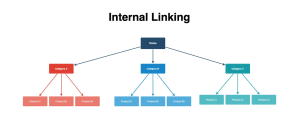
Hierarchical structuring
They help establish a clear, hierarchical layout of a website, making it easier for both users and search engines to navigate the site. This structure ensures that important pages are easily accessible, improving the overall user experience.
Link equity distribution
In SEO, “link equity” refers to the value passed from one page to another through links. Internal linking strategically distributes this value throughout the site, enhancing the authority and ranking potential of individual pages.
Crawl efficiency
By providing clear paths between different sections and pages, internal links facilitate search engine bots’ ability to crawl a site. A well-linked site allows these bots to discover new content more efficiently, improving the site’s visibility in search results.
The strategic use of internal links can significantly influence a website’s SEO performance and user engagement.
By understanding and implementing internal linking effectively, webmasters can enhance site navigation, distribute authority across pages, and ultimately achieve better rankings in SERPs.
Why Are Internal Links Important for SEO?
Source image: Systeme.io
Internal linking is not just a navigational tool; it’s a powerful SEO strategy that can improve your site’s visibility, authority, and user engagement.
By carefully crafting a network of links within your website, you can reap several SEO benefits that contribute to your site’s overall success. Here are the key advantages of effective internal linking:
Improving Site Crawling and Indexing
Enhanced discoverability
Search engines use bots to crawl websites and index their content. Internal links create pathways that lead these bots to discover and index new pages, ensuring that your content gets seen and ranked. Incorporating On-Page SEO services can further optimize these pathways, enhancing your site’s visibility and ensuring search engines can efficiently locate and index relevant pages.
Efficient crawl budget use
A site’s “crawl budget” refers to the number of pages a search engine bot will crawl on a site within a given timeframe. A well-structured internal linking system ensures that bots spend this budget on your most important pages, improving indexing efficiency.
Enhancing page authority and ranking
Distribution of link equity
Internal links pass link equity (or “link juice”) from one page to another. This distribution helps increase the authority of linked pages, boosting their potential to rank higher in SERPs.
Keyword optimization
Using relevant keywords as anchor text for internal links can reinforce the topical relevance of linked pages, helping search engines understand the context better and improving rankings for those keywords. This process is an essential part of keyword optimization in SEO, where strategically selecting and placing keywords enhances the visibility of your pages. Proper optimization helps not only with user navigation but also boosts your site’s overall SEO performance.
Reducing bounce rates and increasing user engagement
Improved navigation
Internal links guide users to relevant content, making it easier for them to find the information they need. This enhances the user experience, encouraging visitors to stay longer on your site.
Increased page views
By providing links to related content, you encourage users to explore more pages on your site, increasing page views and reducing bounce rates.
Enhanced UX
A well-linked content structure helps users navigate your site more effectively, leading to a more satisfactory browsing experience. This can positively impact your site’s SEO as search engines prioritize sites that provide a good user experience.
Boosting content value and visibility
Content interlinking
Linking related articles or pages can highlight the breadth and depth of your content, showcasing your site as a valuable resource on specific topics.
Visibility of older content
Internal linking can drive traffic to older, less visited pages, bringing them back into the spotlight and increasing their value to new visitors.
The strategic application of internal linking within a website’s content strategy can significantly amplify its SEO performance.
By fostering better site crawling and indexing, enhancing page authority, improving user engagement, and boosting content visibility, internal linking serves as a critical component in the quest for higher search rankings and enhanced website visibility.
Through thoughtful implementation, webmasters and SEO professionals can leverage internal linking to unlock the full potential of their site’s SEO.
Types of Internal Links
Internal links are not a one-size-fits-all solution; they come in various forms, each serving unique purposes within a website’s architecture.
Understanding the different types of internal links is essential for webmasters and content creators to effectively structure their sites and enhance their SEO performance.
Here, we explore the main categories of internal links and their roles in improving website navigation and user experience.
Navigational links
Navigational links are among the most common types of internal links, forming the backbone of a website’s navigation system. They are crucial for guiding users through the website and include:
The main navigation menu links
These are the links typically found in the header of a website. They direct users to the main sections or categories of the site, such as Home, About Us, Services, Blog, and Contact Us.
Dropdown menus
For websites with a large amount of content or categories, dropdown menus within the main navigation help organize the content hierarchically, making it easier for users to find specific pages.
Footer links
Often overlooked, footer links serve as a secondary navigation system, providing access to important pages like Privacy Policy, Terms of Service, Sitemap, or Contact Information. They can also include links to popular or recent content.
Contextual links
Contextual links are embedded within the content of a page, such as articles or blog posts, and are designed to provide readers with additional information or related content.
They are key to creating a rich user experience and enhancing the website’s SEO through relevant connections:
Links within articles
These links direct readers to other articles, blog posts, or pages on the website that offer further detail on a topic, concept or mention. They are particularly effective in keeping users engaged and encouraging them to explore more content on your site.
Related posts or products
Often found at the end of an article or product description, these links suggest additional content or products related to the current page, improving the depth of user engagement and increasing page views.
Breadcrumb links
Breadcrumb links offer a navigation aid, showing users their current location within the site’s hierarchy and providing links back to each preceding page.
They are especially useful on websites with multiple layers of content organization, such as e-commerce stores or content-rich portals. Breadcrumbs enhance the user experience by:
Improving navigation
Allowing users to easily trace their path back to more general categories or the homepage.
Reducing clicks
Providing a direct route to higher-level pages without the need to use the back button or navigate through the main menu.
Image links
Images can also serve as internal links when they are clickable and direct users to related content or sections of the site.
This type of link is effective in visual-driven websites, such as portfolios, product catalogs, and galleries. Using image links wisely involves:
Enhancing visual appeal
Making the site more engaging by integrating visual elements with navigation.
Directing to related content
Using images to guide users to related information or products enhances the overall user experience and can improve conversion rates.
Incorporating these various types of internal links strategically throughout your website can significantly improve navigation, distribute page authority, and enhance the user experience.
Each type plays a crucial role in building a coherent, user-friendly, and SEO-optimized site structure, highlighting the importance of a well-thought-out internal linking strategy.
Best Practices for Internal Linking
Implementing an effective internal linking strategy is crucial for enhancing a website’s SEO performance and user experience.
By following best practices, webmasters and content creators can ensure their internal linking efforts contribute positively to their site’s overall success. Here are key strategies to consider:
Using descriptive anchor text
Be specific and relevant
Use anchor text that accurately describes the page you’re linking to. This not only helps users understand what to expect but also provides context to search engines about the linked page’s content. Effective hyperlink optimization SEO can help make sure each link adds value by using precise, meaningful anchor text.
Incorporate keywords judiciously
While it’s beneficial to use relevant keywords in your anchor text, avoid over-optimization. Natural, user-friendly anchor text is more effective than stuffing keywords.
Balancing quantity and quality
Don’t overcrowd your pages with links
While internal linking is beneficial, too many links on a single page can be overwhelming for users and dilute link equity. Aim for a balanced approach that prioritizes user experience.
Focus on relevance
Ensure that the links you include on a page are relevant to the content and add value for the reader. This relevance is crucial for both user engagement and SEO.
Regular audits and updates
Conduct link audits
Regularly review your site to identify and fix broken links, which can negatively impact user experience and SEO. Tools like Google Search Console can help identify crawl errors.
Refresh old content with new links
Updating old articles or pages with new internal links can revitalize them and improve their visibility and relevance. It’s an opportunity to connect older content with newer, related content.
Strategic link placement
Place important links higher in the content
Links placed earlier in a page tend to carry more weight with search engines and are more likely to be clicked by users. Strategically position key internal links towards the beginning of your content.
Use breadcrumb navigation
Breadcrumbs provide users with a clear path of their location within your site and facilitate easy navigation to higher-level pages. They also help search engines understand the structure of your site.
Creating a content hub
Develop pillar pages
Pillar pages are comprehensive guides on a specific topic, linked to many related sub-topic pages. This structure not only enhances user experience by providing in-depth information in a structured way but also boosts SEO by creating a focused network of internal links.
Optimizing link equity distribution
Use nofollow attributes selectively
While most internal links should pass link equity, there may be instances (such as login pages) where a nofollow attribute is appropriate. Use these selectively to focus link equity on pages that benefit your SEO goals.
By adhering to these best practices for internal linking, websites can improve their SEO, enhance user engagement, and create a more cohesive and navigable site structure.
A thoughtful internal linking strategy is an investment in the long-term success of your website, contributing to a better user experience and stronger search engine performance.
How to Set Up an Effective Internal Linking Strategy
Follow the steps mentioned below to implement internal linking effectively.
1. Identify Pillar Pages
Pillar pages are comprehensive, high-value content pieces that serve as the central hub for a topic, linking to and from related supporting content. Create pillar pages that target broad topics relevant to your audience. Link smaller, supporting articles to these pages to create topical authority and guide users through related content.
2. Analyze Existing Internal Links
Analyzing your current internal linking structure helps identify orphaned pages (pages without internal links), broken links, and inefficient linking practices.
Use tools like Screaming Frog or Ahrefs to assess your internal linking. These tools help find gaps and orphan pages that need to be linked.
3. Build Topic Clusters
Topic clusters are groups of related articles or pages that revolve around a single pillar page.
Organize your content into clusters. For instance, if you have a “Digital Marketing” pillar page, link it to supporting articles such as “SEO Basics,” “Content Marketing Tips,” and “Social Media Strategies.” Interlink the supporting articles within the cluster as well.
Optimize Anchor Text for SEO
Anchor text—the clickable text in a hyperlink—is a critical element of internal linking in SEO. Let’s discuss how to optimize these texts for better search results.
Use Varied Anchor Text – Use different variations of keywords and phrases to link to the same page instead of repeating identical anchor text. For instance, instead of using “Learn more” or “Read this guide” as a CTA, alternate with descriptive phrases like “SEO tips for beginners” or “Guide to digital marketing.”
Include Keywords Naturally – Integrate keywords into anchor text seamlessly without forcing them into the content. Instead of “Click here for SEO advice,” try options like “Learn actionable SEO tips here”. This maintains readability while signaling relevance to search engines.
Be Specific – Specific anchor text clearly indicates what the linked page is about. Phrases like “Best tools for SEO audits” instead of generic text like “tools” improve context for both users and search engines.
Common Mistakes to Avoid When Interlinking
While internal linking is a potent tool for enhancing a website’s SEO and user experience, certain missteps can diminish its effectiveness or even harm your site’s performance.
Awareness of these common pitfalls can guide your internal linking strategy toward more productive outcomes. Here, we outline several mistakes to avoid in your internal linking practices:
Over-optimization of anchor text
Excessive use of exact-match keywords
While it’s beneficial to use relevant, keyword-rich anchor text, overdoing it with exact-match keywords can appear manipulative to search engines and negatively impact your SEO. Aim for a natural distribution of anchor text that includes variations and synonyms.
Ignoring user experience
Anchor text should not only be SEO-friendly but also useful and informative for the reader. Ensure that it indicates the linked page’s content.
Linking to low-value or irrelevant pages
Prioritizing quantity over quality
Not all pages are equally beneficial for your internal linking strategy. Focus on linking to content that adds value to the reader’s journey, such as cornerstone content, rather than filler or low-quality pages.
Irrelevance
Ensure that the linked content is directly relevant to the context of the anchor text and the page’s content where it is placed. Irrelevant links can confuse readers and detract from the user experience.
Neglecting internal link maintenance
Broken links
Over time, websites evolve, and content gets moved or deleted, leading to broken links. Regular audits are essential to identify and fix broken internal links to maintain site health and user experience.
Link equity dilution
Spreading too many internal links indiscriminately across your pages can dilute the link equity passed to important pages. Strategically place internal links to channel more authority to key pages.
Ignoring the user journey
Inadequate linking depth
Focusing only on top-level pages without linking deeper into your site can result in missed opportunities to engage users further. Using Ahrefs to find internal linking opportunities can help you create a network of links that encourages deeper exploration of your site.
Overloading pages with links
While it’s important to include internal links, overcrowding a page with too many links can overwhelm users and detract from the content’s value. Strike a balance between providing useful links and maintaining a clean, readable page.
By steering clear of these common mistakes, you can refine your internal linking strategy to better support your SEO efforts, enhance the user experience, and ensure your website’s architecture contributes positively to your online presence.
Tools & Resources for Effective Internal Linking
Source image: net2.com
Implementing a successful internal linking strategy requires not only a keen understanding of SEO principles but also the right tools and resources to execute it efficiently.
These tools can help identify opportunities for internal linking, audit existing links, and optimize the site structure for better performance.
Below are some essential tools and resources that can facilitate effective internal linking practices:
Internal link analysis tools
Screaming Frog SEO Spider
A comprehensive tool that crawls websites to identify broken links, analyze page titles, and detect potential SEO issues. It’s invaluable for auditing internal links and ensuring a healthy site architecture.
Ahref Site Audit feature
Offers detailed insights into your website’s internal linking structure, including issues like broken internal links, pages with few internal links, and more. Ahrefs also provides suggestions for improving your internal linking strategy.
WordPress plugins for internal linking
Yoast SEO
Besides its wide range of SEO features, Yoast SEO offers internal linking suggestions as you write content, helping to streamline the process of integrating relevant links.
Link Whisper
A powerful tool designed specifically for improving internal linking, offering automatic linking suggestions based on your content, thus saving time and enhancing your site’s SEO.
Equipping yourself with these tools and resources can significantly enhance your ability to implement an effective internal linking strategy.
They offer the insights and automation necessary to optimize your site structure, leading to improved SEO performance and a better user experience.
The Strategic Value of Internal Links
Internal links stand as a pivotal component in the scaffolding of a successful SEO strategy, significantly influencing both a website’s ranking potential and the quality of the user experience it delivers.
Their strategic deployment can guide visitors through a journey of discovery on your site, encouraging deeper engagement with your content while simultaneously signaling to search engines the relevance and value of your pages.
By adopting best practices, avoiding common pitfalls, and leveraging the right tools and resources, website owners and SEO professionals can harness the power of internal links to craft a more cohesive, accessible, and authoritative online presence.
Remember, the effectiveness of your internal linking strategy is not solely in its ability to improve SEO metrics.
If you are looking for an SEO expert to help you with your internal linking strategy, then Techmagnate is the one for you.
The leading SEO agency in India, our team of more than 250 SEO experts can and will utilize their 17 years of experience to bring your brand to the top of SERPs.
Contact us today to rank your brand at the top of search engine results.
Neha Bawa is the Director of Brand Marketing at Techmagnate. She has worked in Digital Marketing since 2012 and has specialised in content creation. She has earned a Master’s degree in Interactive Communications from Quinnipiac University in Connecticut, U.S.A. Her interests lie in creating great content, docs, and working towards sustainability through biodiversity.
Get the most valuable search related insights about leading brands, trending keywords, search volumes, fastest growing categories, city-level insights and much more!
It has come to our notice that fraudulent job offers are being circulated on the internet through messaging apps like WhatsApp and Telegram, which falsely claim to be from Techmagnate. We take this matter seriously and would like to caution all candidates to be wary of such postings.
Please Note That –
We do not charge any fees/security deposit/payment from candidates, irrespective of the professional experience they hold, for job applications or interviews
Official communication channels include our website and verified social media accounts, primarily LinkedIn.
Kindly double-check the domain name – @techmagnate.com – in the email address
We follow a transparent and ethical approach for hiring/onboarding supported by proper documentation.
Ensure that you only apply through verified channels to avoid being scammed. We also recommend that you exercise caution when sharing personal information or financial details with any job posting or recruitment agencies claiming to represent us.
We want to ensure that potential candidates interested in joining Techmagnate have a safe and positive experience.
If you find that someone that fits the description above has reached out to you, please notify us immediately at jobs@techmagnate.com.
 Important Alert:
 Important Alert: