Beware of fake job offers and payment requests. We only use official email IDs and never conduct interviews on messaging apps.Beware of fake job offers and payment requests. We only use official email IDs and never conduct interviews on messaging apps.
Summary:Internal linking enhances the effectiveness of your website by directing your viewers to go from one page to another. This article will tell you how to identify and leverage internal linking opportunities to optimise your website’s performance and traffic.
Key Takeaways:-
Internal links are critical for your website’s overall SEO success.
They lead users to relevant information, improve navigation, decrease chances of bounce rates, and optimise the user experience.
In just 4 steps we can identify interlinking opportunities to give optimum user experience.
Many experts claim that SEO is evolving and there are now new factors that affect your SERP rankings, because of which businesses tend to ignore internal linking opportunities. However, according to John Mueller, a senior search analyst at Google,
“Internal linking is super critical for SEO. It’s one of the biggest things you can do on a website to guide Google and visitors to the pages you think are important.”
Strategically using internal links in your SEO strategy can boost the performance of all the linked pages. Using internal links redirects how PageRank flows or travels around your website. While the PageRank toolbar has not been around since 2016, Google still considers PageRank as one of the key factors.
Discover What Your Customers Search ForDiscover What Your Customers Search For
Get insights on evolving customer behaviour, high volume keywords, search trends, and more.
Before getting into its importance, let’s understand what internal links are first.
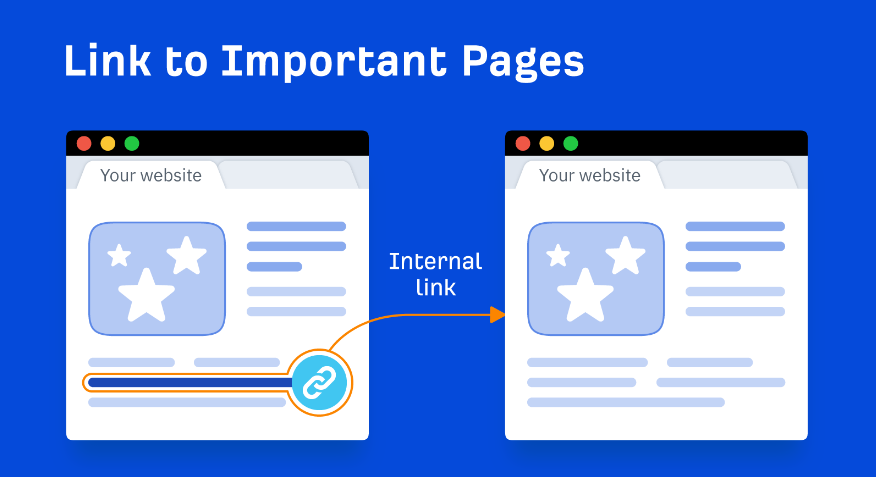
Internal links comprise an HTML code embedded in a targetted piece of web content that can take you from one page to another instantly. Using internal links helps establish relevance between different pages and components of your website. They highlight related information that is spread across your website, in the same place. As a result, Google understands how these pages and content pieces relate to the rest of the content.
Additionally, internal links also offer SEO benefits for your website UX because it ensures a user won’t get lost while browsing long articles. They take your audience to relevant pages on your website that could be in another section.
For example, if you have an article on SEO in your website’s blog section and a whole section of SEO services that you offer on a different landing page. If you link both of these internally, users and potential leads can go directly to your expert services and engage with your content there.
Without the internal links, you would have to depend on your user going directly from your website’s blog section to your services section – which we know is very rare to happen.
Benefits of Internal Links
1. Improve navigation for search engines and users
We have discussed this above as well since this is one of the most important benefits of using internal links. Identifying and leveraging internal linking opportunities can help users navigate your website easily, which makes it easier for them to scroll multiple pages and go back to the first page whenever they want to.
Internal links are also helpful for crawlers as they help search engine crawlers identify new pages on your website relevant to topics they might be indexing.
2. Lead users to relevant information
Another key benefit of internal linking is it helps website visitors find relevant content aligned with their search intent. This makes your website more holistic for them, not focusing on just one product or content piece. Instead, you take up several related topics or themes across various sections of your website that could provide more value for your viewer.
Internal linking also helps users who are browsing for possible services or products and are trying to understand how to relate their searches and get enough data before purchasing. For instance, by creating blogs or articles relevant to the products or services you offer, your chances of converting a visitor to a paying customer increase.
3. Drive traffic to your web pages
Internal links also drive traffic to pages that might otherwise get overlooked. Every time a user clicks on an internal link, it does drive traffic to your platform but it also tells Google that this is additional ‘link juice’ that passes between your website’s pages.
4. Decrease bounce rate
Websites with a higher bounce rate don’t rank too high on SERP rankings. Besides easier website navigation, using internal linking opportunities on your website can help decrease your website’s bounce rate too.
5. Enhance user experience
Using internal links can also improve your website’s UX. Most users today expect instant results, even a couple of seconds’ delay could ruin their user experience. Using internal links will give these users faster access to previous pages.
6. Improve your PageRank
Your website’s bounce rate is important to analyse because it affects your SERP ranking in more ways than one. Enhancing your user experience makes your content appear more fascinating to the search engine. According to the newest Panda updates, your bounce rate is a significant factor in determining your PageRank. A low bounce rate keeps website crawlers and your users happy.
7. Help indexing and crawling
Using internal linking helps Google bots in recreating a user’s thought process. They visit your website and follow every internal link to every page that is already indexed. Leveraging effective internal linking opportunities can help search engine crawlers find your least visited pages. These links boost other pages to ease the indexing and crawling process to improve your SERP ranking.
8. Establish Topical Authority and Topic Clusters
Interlinking related articles (e.g., linking all “content marketing” posts to a central “Content Strategy Pillar”) establishes a Topic Cluster. This signals to search engines that your website is a comprehensive, authoritative source on that entire subject, a major factor in modern E-E-A-T-focused SEO.
How To Identify Internal Linking Opportunities Using Ahrefs
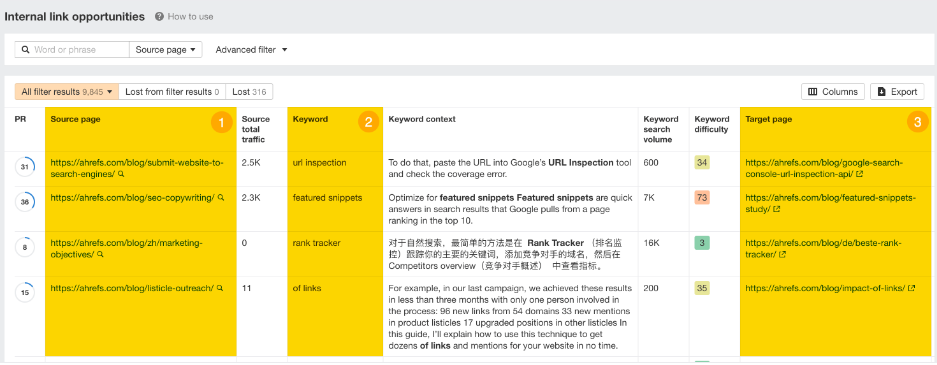
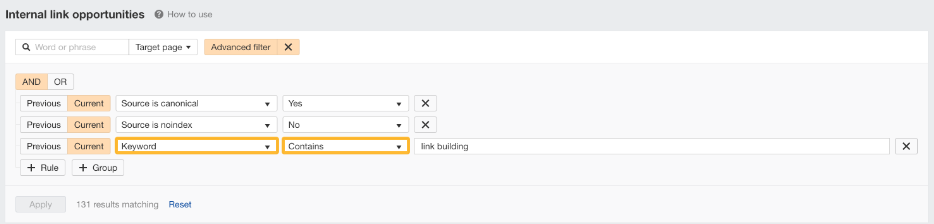
The first step in finding opportunities for internal linking should be to list all your web pages. You can use Ahrefs’ internal linking report to accomplish this task. This report can be generated using Site Audit, their website audit tool. Right out of the gate, you will receive a list of internal linking opportunities based on your website’s keyword ranking. It looks something like this:
There are several actionable ways that you can use this report to identify internal linking opportunities.
1. View link opportunities by page
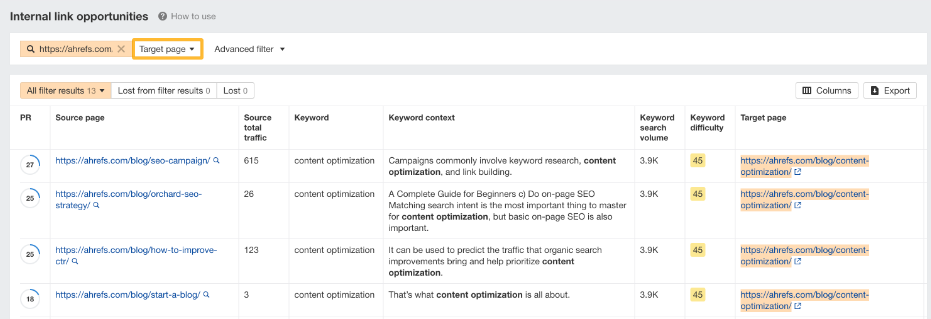
If you have just updated your website content or wish to drive traffic to one specific page, the Ahrefs report can help you achieve that. Set your search to the ‘Target Page’ and add the relevant URL in the search box.
As you see above, you will find a list of potential web pages that can link to your target page.
2. View link opportunities by keyword
If you are trying to focus on keyword optimization and identify keyword opportunities most relevant to your business right now, try this method. All you need to do is click the Advanced filter, add rule sets to the Keyword option, and set the conditions to “Contains.” After this, you simply enter the relevant keywords.
3. View link opportunities by Authority
If you look at the PR (Page Rating) of a source page, it shows you the internal backlink profile of that page based on a 100-point scale. When you click the PR column, you will see the pages with the most authority.
If you link pages internally from high-authority pages, the positive impact on your SEO will be much higher.
4. Don’t forget the other media opportunities
Videos and images also provide internal linking opportunities, but these often get overlooked. These opportunities are highly beneficial because they provide greater value than text. Even without relevant keywords in your content, you can make your page SEO-friendly by adding internal links within alt tags or your images or video citations/transcripts.
5. Uncover Competitor’s Cornerstone Content (Competitor Gap Analysis)
Use the Ahrefs Site Explorer on a competitor’s domain, then run the “Best by links” report. The top pages in this report are their Pillar/Cornerstone Content. Audit your own site to see if you have content covering those topics. If you do, link your related pages to it. If you don’t, this is a Content Gap opportunity.
Things To Keep In Mind While Leveraging Linking Opportunities
As a business website owner, optimising all your website resources to improve your SEO is one of your key responsibilities. There are a few things to keep in mind as you search for internal linking opportunities.
1. Make users your top priority
While looking for linking opportunities, make sure you always keep a user-centric mindset. Always ask yourself, ‘What information will be useful for my audience? What are they searching for?”
2. Focus on creating value
Internal linking focuses on optimising your content according to your content strategy. But don’t let that make you forget about your users. Your goal should be to create value for your end users by linking to content that aligns with your user’s search intent. One way to do this is by writing down internal linking ideas before you start searching for opportunities. This will ensure your ideas are focused on adding value for both search engines and end users.
3. Do it, but don’t overdo it
Adding too many internal links or low-quality links can negatively impact your SERP metrics and possibly send out spam signals to the search crawler. Make sure you place no more than one internal link every 300 words or so.
It’s time to take the first step
There’s no one-size-fits-all when it comes to linking strategies. New internal linking opportunities will vary based on industry, audience, and topic. For the best results, make sure you choose an SEO partner that understands how internal linking works and has a proven track record of successful clients.
Sarvesh Bagla is an enterprise SEO expert and industry leader who has driven transformational digital growth for India’s top brands across the BFSI, Healthcare, Automotive, and ECommerce industries. As the Founder and CEO of Techmagnate, he leads large-scale organic search strategies and performance marketing campaigns for businesses looking to succeed in today’s AI-driven search landscape.
A strong advocate for thought leadership, Sarvesh is deeply involved in SEO evangelism and regularly contributes to industry discussions through LinkedIn, webinars, and CMO roundtables. His focus today is on helping brands prepare for an AI-first SEO future (AEO, GEO) and strategies for Large Language Models (LLMs) at the core.
Get the most valuable search related insights about leading brands, trending keywords, search volumes, fastest growing categories, city-level insights and much more!
It has come to our notice that fraudulent job offers are being circulated on the internet through messaging apps like WhatsApp and Telegram, which falsely claim to be from Techmagnate. We take this matter seriously and would like to caution all candidates to be wary of such postings.
Please Note That –
We do not charge any fees/security deposit/payment from candidates, irrespective of the professional experience they hold, for job applications or interviews
Official communication channels include our website and verified social media accounts, primarily LinkedIn.
Kindly double-check the domain name – @techmagnate.com – in the email address
We follow a transparent and ethical approach for hiring/onboarding supported by proper documentation.
Ensure that you only apply through verified channels to avoid being scammed. We also recommend that you exercise caution when sharing personal information or financial details with any job posting or recruitment agencies claiming to represent us.
We want to ensure that potential candidates interested in joining Techmagnate have a safe and positive experience.
If you find that someone that fits the description above has reached out to you, please notify us immediately at jobs@techmagnate.com.
 Important Alert:
 Important Alert: