Beware of fake job offers and payment requests. We only use official email IDs and never conduct interviews on messaging apps.Beware of fake job offers and payment requests. We only use official email IDs and never conduct interviews on messaging apps.
Summary: Internal links on your website connect various pages and help visitors navigate and reach the desired pages. The process of adding these links is known as interlinking. This blog will tell you the benefits of a strong interlinking strategy, why your website needs it, and how you can benefit from an SEO audit with Sitebulb.
Key Takeaways:-
What is internal linking or interlinking?
The benefits of a Sitebulb SEO strategy for your website
How to improve interlinking on your website using Sitebulb
How to implement internal link optimisation methods
Table of Contents
Introduction to interlinking – what it is and why you need it
Simply put, an internal link is a link within your website that connects one page on your website to another. It is one factor affecting how search engines crawl, index, and rank your website.
It is also one of the easiest and most effective on-page optimization practices. While most search engines rank websites solely based on inbound links from other websites, Google identifies internal links as one of the key factors of SERP ranking. Since then, interlinking has been a big part of any successful SEO strategy businesses use today.
Discover What Your Customers Search ForDiscover What Your Customers Search For
Get insights on evolving customer behaviour, high volume keywords, search trends, and more.
1. It improves the ranking of existing website content
Search engines evaluate the link position, the number of internal links on a website, and the links’ anchor text to understand the context and contents of a page. And which pages on the website are more important in the site’s overall structure.
Structuring your content and ensuring internal links are placed strategically will ensure a smooth flow of information from your website to the end user. This also ensures information is themed and not erratic or random. For example, it’s important to first showcase your products and prices before sharing a store locator with the website visitor. Strategic interlinking can help search engines identify which pages you deem more important and rank them higher than others.
2. It helps new content rank higher faster
Search engines can easily find new content, but that doesn’t guarantee a higher SEO ranking instantly.
Consider that you’ve made a new landing page with content you’re certain will perform well. Using more internal links to that page would tell the search engine that this page needs more attention than those with fewer interlinks. Also, instead of just publishing the new content, you can edit old content to add links to the newest page. All these actions are signals to the search engine that you place more importance on this page.
Common Interlinking Problems and Fixes
Backlinks and internal links can both impact your website’s search ranking. Before creating new internal links, make sure all existing links are optimised. Otherwise, any effort to add new links might be wasted. There are a few simple fixes that can help you get the most value out of your existing internal links.
Check for ‘nofollow’ tags – A nofollow tag causes your internal links to drop out of the link graph which means that that page won’t get indexed. Make sure you eliminate these nofollow tags during your research.
Remove redirect chains – If Google has to follow extra redirects to reach a certain page, every redirection dilutes your link equity. Any internal link that is part of a chain of redirects doesn’t affect user experience but will negatively impact your SEO.
Add rel=next and rel=prev – Google has had issues in the past when it comes to crawling deeper pages within a website’s sitemap. While the search engine does say it doesn’t use these tags while crawling a website, other search engines do use them and most websites using rel=next and rel=prev have seen higher SERP rankings.
What is Sitebulb and how does it work?
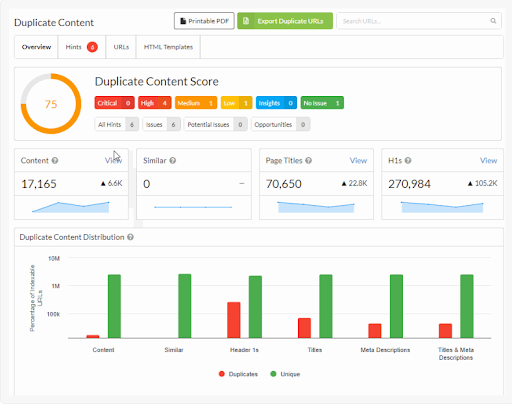
Sitebulb is a website crawler that helps you conduct website audits and share insights more effectively and thoroughly. Conducting a Sitebulb internal link audit helps you identify which pages have few or no internal links and which ones have too many links leading to them. It also helps identify duplicate content that might be diluting or dividing website traffic, as shown below.
Sitebulb is easy to use, easy to set up, cost-effective and scalable. It also exports all your data automatically to Google Sheets once your audit is complete, making it easier for you to download and share your findings. You can also extensively customise your automated Sitebulb dashboards using Looker Studio.
The best thing about Sitebulb is that it is highly intuitive compared to other crawlers like Screaming Frog. It provides friendly nudges that help you optimise your insights and prioritise tasks.
Download and install Sitebulb for free
Sitebulb offers a free trial, so you can download and get started instantly.
To get started, download it on your desktop and create a new project for your website or business.
Wait a while till the crawler collects all the data for your website.
Click the Link tab and open that section. Here you will find all the dates regarding your internal links.
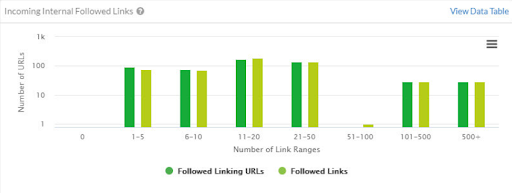
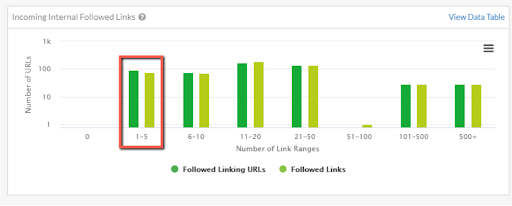
You will also find a graph showing Incoming Internal Followed Links. This will give you a detailed overview of the number of URLs and your link range figures.
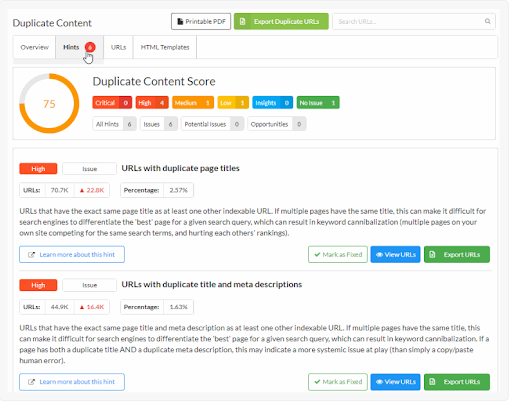
To dive deeper into the data, go to the Hints tab on the screen. This will help you find new opportunities for content and interlink optimisation.
Once you find URLs with few or no internal links, you know where the problem lies. You can export this data and use it to effectively improve your interlinking strategy for better SEO ranking.
How can Sitebulb help you create your interlinking strategy?
1. By finding pages that need more links
Saying a page needs more internal links just means that a particular page will rank higher with better interlinking. So the first and fastest way to see results is by optimising content that is already performing well. You might have pages that are already on the first page of Google search results. Adding just a few internal links could boost them to the top.
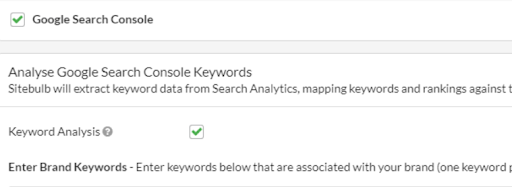
For best results, extract your Search Console keyword ranking data. Sitebulb easily lets you connect your search console account and shows results when you check the ‘Keyword analysis’ box.
Don’t miss buried pages
A buried page has not got the opportunity to rank. You can identify these pages in two ones. The easiest is to check the links report as mentioned earlier.
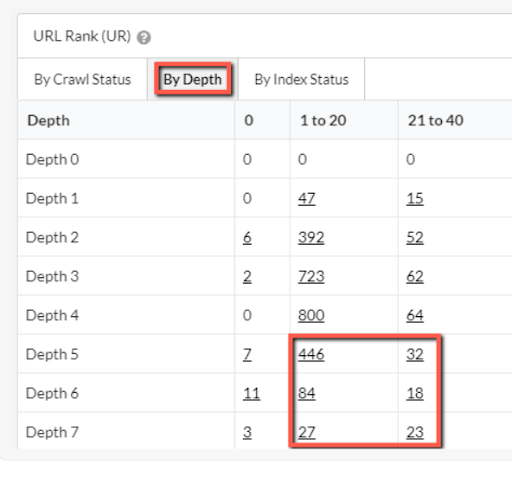
The other Sitebulb chart that can help is checking URL ranks ‘By Depth’
As you can see in the lower left quadrant, these URLs have relatively low URL ranks since they are ‘deep’ in your website.
2. By finding pages that need better anchor text
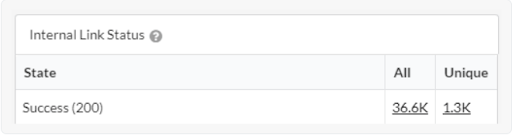
This includes pages that have enough internal links but lack optimised or consistent anchor text. A website with about 100 pages could typically have over 1000 internal links that you can update while optimising anchor text. The chart below shows almost 37000 internal links with 1300 unique links.
Since it’s not possible to update the anchor text for each of them, you need to pick the priority ones and optimize the most important pages of your website.
Don’t miss pages with similar incoming anchor text
Content overlap is a common SEO problem within a website, where multiple pages compete for the same keywords or intent, often unintentionally. This occurs when two or more pages are linked internally using identical or very similar anchor text.
Keywords struggling to rank despite positive indicators.
Sitehub helps you tackle this issue by analysing anchor text usage across pages to find different variants of the same anchor text. The process for this is quite straightforward.
From the Anchor Text column, look for a text phrase that you want to analyse. Click the text to open the anchor text data view for the selected phrase.
Analyse the Target URLs to check if there’s at least one URL linked to the anchor text.
Click ‘Links’ to analyse individual links using the anchor text.
Optimising incoming anchor text
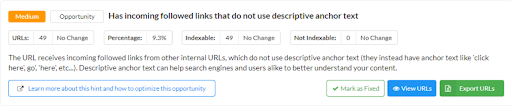
Developers often use ‘click here’ and similar terms in their anchor text, either because they don’t know about SEO or they don’t deem it important. However, it is proven that Google finds it easier to crawl pages and links using descriptive anchor text. This is where Sitebulb becomes a lifesaver.
By default, Sitebulb is designed to identify and point out non-descriptive anchor text, as you can see above. This can help you identify where the problem lies and take necessary corrective steps.
How to choose the right implementation method for internal link optimisation?
Identifying the best method to optimise internal links cannot have a one-size-fits-all answer. There are several things you need to understand, all of which we have talked about above.
The importance of interlinking and how it affects SEO
The value to be gained from scaling up and growth
How the Google algorithm works
Choose the best search intent framework for your goal
Search intent is the answer to the question, ‘What is the user trying to achieve when they are entering the search term?” For instance, a user searching for ‘on-page SEO’ is looking for information (informational intent) but someone looking for ‘on-page SEO services’ is trying to find paid services (transactional intent).
There are several frameworks and models under which you can categorise search intent. Let’s take a look at the most popular and effective ones.
See. Think. Do. Care. – Google itself uses this framework for its KPI conversations and so do most businesses in the industry. It is best suited for cross-functional teams of SEO specialists, designers, developers and business analysts.
Know, do, visit, website – This framework works best in businesses having multiple physical locations.
Commercial, informational, navigational, transactional – This framework is ideal if you’re working extensively with paid search professionals or teams.
Awareness, Interest, Desire, Purchase – This classic marketing funnel or some other form of it is most widely used by traditional businesses undergoing a digital transformation.
Adjust internal links manually
This option is still there and is widely preferred by small businesses with small websites. Simply go to the page you wish to add internal links to and edit the text in your CMS to update the link or anchor text. It’s that easy!
Get expert help in strategic interlinking
Several factors affect how well or poorly your website performs when it comes to search engine rankings. A strategic interlinking approach is a highly effective way to optimise search rankings while being in control of the process. Conducting a comprehensive SEO audit can help identify gaps in your interlinking strategy and optimize your site for better visibility.
What you need is someone who understands SEO at another level to help you overcome the pitfalls and early challenges you will inevitably face. By partnering with an SEO expert and conducting a comprehensive SEO audit services, you can identify areas for improvement and optimise your strategy for better results. This will help your content rank much higher and faster. Contact us today to get started!
Sarvesh Bagla is an enterprise SEO expert and industry leader who has driven transformational digital growth for India’s top brands across the BFSI, Healthcare, Automotive, and ECommerce industries. As the Founder and CEO of Techmagnate, he leads large-scale organic search strategies and performance marketing campaigns for businesses looking to succeed in today’s AI-driven search landscape.
A strong advocate for thought leadership, Sarvesh is deeply involved in SEO evangelism and regularly contributes to industry discussions through LinkedIn, webinars, and CMO roundtables. His focus today is on helping brands prepare for an AI-first SEO future (AEO, GEO) and strategies for Large Language Models (LLMs) at the core.
Get the most valuable search related insights about leading brands, trending keywords, search volumes, fastest growing categories, city-level insights and much more!
It has come to our notice that fraudulent job offers are being circulated on the internet through messaging apps like WhatsApp and Telegram, which falsely claim to be from Techmagnate. We take this matter seriously and would like to caution all candidates to be wary of such postings.
Please Note That –
We do not charge any fees/security deposit/payment from candidates, irrespective of the professional experience they hold, for job applications or interviews
Official communication channels include our website and verified social media accounts, primarily LinkedIn.
Kindly double-check the domain name – @techmagnate.com – in the email address
We follow a transparent and ethical approach for hiring/onboarding supported by proper documentation.
Ensure that you only apply through verified channels to avoid being scammed. We also recommend that you exercise caution when sharing personal information or financial details with any job posting or recruitment agencies claiming to represent us.
We want to ensure that potential candidates interested in joining Techmagnate have a safe and positive experience.
If you find that someone that fits the description above has reached out to you, please notify us immediately at jobs@techmagnate.com.
 Important Alert:
 Important Alert:





















 6th Feb | Invite-only


