Beware of fake job offers and payment requests. We only use official email IDs and never conduct interviews on messaging apps.Beware of fake job offers and payment requests. We only use official email IDs and never conduct interviews on messaging apps.
Summary: In this guide to navigating, avoiding, and fixing orphan pages, you will learn how to identify and eliminate orphan pages and, most importantly, how to avoid them in the future.
Key Takeaways:-
Understanding what orphan pages are
Orphan pages on your website can affect SEO in many ways
Find and fix orphan pages on your website
Prevent pages from getting orphaned
While making a website, many glitches and errors occur across landing pages. Some of them are seemingly insignificant, like punctuation marks or spelling errors, and are easily fixable. Others, like SEO orphan pages, are more critical and can negatively impact your site’s visibility and SEO strategy. An orphan page on your website is one such example.
A page on your website that doesn’t connect you to any other website or page is called an orphan page. Having one orphan page on your website might not seem like a big deal. However, they accumulate over time due to a lack of regular website audits and content updates. These pages are wasteful because, not only do they sit there without adding any value or engagement to your website, but they also use up your crawling budget. They also degrade the user experience on your website and confuse visitors.
Table of Contents
What are orphan pages?
Orphan pages are pages on a website that mistakenly have no internal or external links. As a result, these pages are inaccessible to search engine crawlers or end users. This disconnected or orphaned page adds no value to your website or business and merely sits on your sitemap occupying space without providing any benefit. To access an orphan page, a user has no option but to enter the URL directly into the search bar.
Make sure you don’t confuse an orphaned page with a dead page. A dead page does not lead the user anywhere further, forcing them to either leave the site or click the return button.
However, there are links within the website leading to a dead page, which is not the case with an orphaned page. Imagine a small e-commerce store’s ‘Find a store’ page with the addresses of each store within your city. You can look at the addresses but cannot take any further action on the page. This is an example of a dead page. On the other hand, if the e-commerce store has a winter sale promotion page that they forget to take down, that page remains even after all the links to that page are removed in the following season. This is an example of an orphaned page.
Discover What Your Customers Search ForDiscover What Your Customers Search For
Get insights on evolving customer behaviour, high volume keywords, search trends, and more.
There are many reasons for the formation of orphaned pages. This includes:
Change in internal links during domain or CMS migration
Removal of category pages without internal link redirection
Seasonal promotion pages or landing pages that don’t get taken down
Incorrect CMS usage
Incomplete processes followed after A/B testing campaigns are executed
How do orphan pages affect SEO?
SEO orphan pages waste several opportunities for website traffic because they are not discoverable through regular navigation or search. Let’s explore the three main consequences of orphan pages:
1. The page does not get indexed
Since there are no links to the page, a search engine crawler finds no path to locate it. And if the crawler can’t reach it, they can’t index it. As a result, an entire page on your website gets overlooked by the search engine. In theory, the crawler goes through your sitemap to locate the orphan page, but your search rankings still take a hit.
2. Poor rankings on SERPs
Without any internal page links to a page on your website, SERPs tend to lower the ranking of that page even after sitemap crawling. This is because of PageRank, a Google algorithm that evaluates inbound links to determine SERP rankings. Imagine every inbound link to be a vote for the credibility or quality of a web page. The value of each link builds up its ‘link equity’, hence creating more internal links is a good way to build link equity for each page across your website. By this standard, orphaned pages are low on link equity, resulting in poor search ranking and low or zero organic traffic.
3. Poor user experience
An orphan page is almost invisible to the end user. Imagine your customer visited a promotional landing page six months ago, and wishes to revisit the page. If you’ve removed all the inbound links to that page, the only way to find it would be through their search suggestions and history. Now imagine you orphan that promotional page even before anyone can visit. You’re losing out on traffic and giving competitors a chance to surpass you.
When you regularly update your website without conducting a site audit or you change content without reviewing the hyperlinked pages, you’re more likely to have a higher orphan page count on your website. Is there a way to fix this?
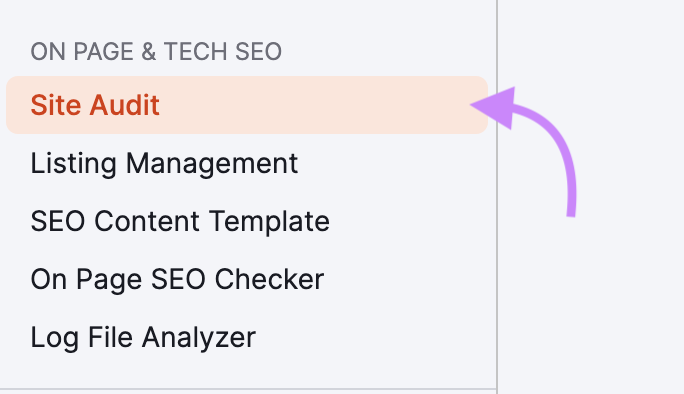
Image source: semrush
How to find orphan pages?
There’s no upside to having one or more orphan pages on your website. Business and website owners realise over time that the disadvantages of orphan pages are far greater than the effort to fix them. Thanks to SEO experts, there are several ways to identify orphan pages across your website.
1. Check all URLs against your sitemap
Your website’s XML sitemap contains the URL location of every video, file, and page linked to your website. Orphaned pages might not have any direct inbound links, but if you can see them on the sitemap, you’ll find the URL too. The easiest way to find it is by typing nameofyourwebsite.domainname/sitemap.xml.
2. Use a web crawling tool
Getting a detailed list of every orphaned page on your website will require a web crawler tool. Top web crawlers today include Scrapy, Semrush, and Screaming Frog. Most of them have a dedicated section for orphan pages. Make sure you’re connected to Google Analytics and Google Search Console before you get started. Consulting an SEO expert can make the process easier for you and get you expert guidance on unfamiliar nuances.
3. Cross-reference the crawled URLs with a log analyzer
An alternate method requires you to export a list of all your website’s URLs and cross-reference them using the log files of your server. Orphan pages will show up in your logs but not in the crawl data. This will help you identify which pages need to be fixed.
How to fix orphan pages on your website?
Once you’re done identifying your website’s orphan pages, you will have an indexable URL list for your website that identifies all orphan links. Your next step will be determined by the value the page adds to your website. An immediate fix could be driving traffic to the page by sharing it on social media or other platforms. If it remains on your sitemap, there’s a chance Google will pick it up, so make sure your SEO on the orphaned page is optimised.
So looking at it broadly, there are three actions you could take next:
Remove the page from your domain and sitemap if it adds no value and delete the webpage.
Take the content from the orphan page and add it to an indexed page so that it serves its purpose. You can do this before deleting the original page.
Manually add inbound links that lead to the page.
Unsure about which action to take? Here are a few questions you can ask first:
If your page is getting ranked on search engines somehow, can you improve your off-page SEO to improve SERP rankings?
Did the orphaned page pick backlinks that you can redistribute?
Do you still have a purpose for the page? What do you lose by deleting that page?
Does your website have any content visitors might find useful?
How to prevent orphan pages in the future?
Prevention is better than cure. Ideally, make sure all your website pages have inbound links and conduct periodic SEO site audits. This ensures you don’t accidentally orphan any page, especially after a content revamp, and helps avoid the need for fixing 404 errors later.
Instead of deleting old posts entirely, you might want to consolidate them with relevant pages throughout your website. Set up 301 redirects from the URLs you plan to remove and direct them to similar pages. This will prevent 404 errors and ensure the pages don’t get isolated on your domain.
Choose an SEO expert with a successful track record and industry-leading clientele for a strategic approach to website optimization and SEO planning. Get in touch with us today.
Frequently Asked Questions (FAQs)
Will fixing my orphan pages guarantee a significant SEO boost?
Orphan pages are nearly impossible to locate for both end users and search engine crawlers. Adding even a single inbound link from your website can significantly improve your SEO as well as organic website traffic.
Is fixing orphan pages a complex task?
Fixing orphan pages involves adding inbound links, site audits and SEO expertise. With almost 2 decades of expertise, Techmagnate can help you overcome all your challenges with orphaned pages.
What should I do after finding orphan pages?
You can either audit your website and add inbound links to your orphan pages, or you can remove them if they don’t serve a purpose (eg: an expired in-store promotion or offer page).
Neha Bawa is the Director of Brand Marketing at Techmagnate. She has worked in Digital Marketing since 2012 and has specialised in content creation. She has earned a Master’s degree in Interactive Communications from Quinnipiac University in Connecticut, U.S.A. Her interests lie in creating great content, docs, and working towards sustainability through biodiversity.
Get the most valuable search related insights about leading brands, trending keywords, search volumes, fastest growing categories, city-level insights and much more!
It has come to our notice that fraudulent job offers are being circulated on the internet through messaging apps like WhatsApp and Telegram, which falsely claim to be from Techmagnate. We take this matter seriously and would like to caution all candidates to be wary of such postings.
Please Note That –
We do not charge any fees/security deposit/payment from candidates, irrespective of the professional experience they hold, for job applications or interviews
Official communication channels include our website and verified social media accounts, primarily LinkedIn.
Kindly double-check the domain name – @techmagnate.com – in the email address
We follow a transparent and ethical approach for hiring/onboarding supported by proper documentation.
Ensure that you only apply through verified channels to avoid being scammed. We also recommend that you exercise caution when sharing personal information or financial details with any job posting or recruitment agencies claiming to represent us.
We want to ensure that potential candidates interested in joining Techmagnate have a safe and positive experience.
If you find that someone that fits the description above has reached out to you, please notify us immediately at jobs@techmagnate.com.
 Important Alert:
 Important Alert:





















 6th Feb | Invite-only


