Beware of fake job offers and payment requests. We only use official email IDs and never conduct interviews on messaging apps.Beware of fake job offers and payment requests. We only use official email IDs and never conduct interviews on messaging apps.
Summary: This blog post is an informative guide for digital marketers, SEO professionals, web developers, and designers. It begins by explaining the importance of canonical URLs in SEO, particularly for dealing with duplicate content issues on websites.
The document then elaborates on Google’s interpretation of canonical URLs, highlighting how these URLs assist Google in indexing and ranking the most relevant pages.
Although search engines are highly evolved, they often face challenges when indexing multiple pages that have similar or duplicate content. With such content, search engines aren’t able to figure out which version is more relevant to a given search query.
A canonical URL is considered the ’master’ version within a set of pages featuring duplicate content. This preferred URL is what Google and other search engines prioritize and display in the search results.
Table of Contents
What is a Canonical URL?
A canonical URL is an HTML element used to guide search engines toward the preferred version of a webpage when multiple versions of the same content exist. This tag helps to prevent content duplication penalties by signaling which page should be indexed and ranked in search results. The use of a canonical URL ensures that search engines focus on the authoritative version, consolidating SEO value and improving rankings.
In this case, the canonical URL will be prioritized, and the alternate URL will be ignored by search engines, helping to prevent duplicate content issues.
What Is a Canonical Tag?
A canonical tag, also known as a “rel=canonical,” is a small HTML tag that helps search engines understand the preferred version of a page when multiple URLs have the same or similar content.
Implementing canonical tags helps search engines consolidate link equity, improve crawl efficiency, and avoid penalizing sites for duplicate content. This tag should always reference the master or original URL for the content.
Canonical Tag HTML Syntax:
How do Canonicals Work?
Search engines, especially Google, use canonicalization to identify, read, and index content from the ‘preferred’ version of a page, from a set of multiple similar pages. Here’s how the process of canonicalization happens.
Identifying Duplicate Content: Different URL parameters, HTTP/HTTPS versions, www/non-www versions, and multiple paths leading to the same content can confuse Google.
For example, both
https://example.com/blog/seo-tips and
https://example.com/blog/seo-tips?ref=homepage
contain the same content, Google identifies them as duplicates.
Selecting a Canonical URL: Once Google reads the canonical URL, it gives more weight to that page as it’s considered more authoritative than other pages. The selection of the canonical URL is dependent on various other factors, such as content similarity, domain authority, user engagement metrics, and link popularity.
Indexing and Ranking: The selected canonical URL is indexed, displayed, and ranked by Google. While the other URLs still exist and are accessible, Google only shows the canonical URL in the search results.
Decoding Canonical Tags
Similar to a canonical URL, canonical tags also indicate to Google that a specific URL represents the master copy of a page. While the former is displayed as a URL structure, the latter is an HTML snippet found in a website’s source code in the <head> section.
The canonical tag in SEO directs Google to the ‘master’ page in case of duplicate content, suggesting consolidation of link equity. Canonical tags play a crucial role in determining which version of a page should be prioritized in search rankings, especially when there are multiple variations of a page, such as product pages filtered by various attributes.
Essentially, canonical tags resolve the issue of duplicate content, especially in e-commerce websites, where the same product descriptions can be found on multiple pages. With the correct implementation of canonical tags, Google can better understand a website’s structure, and identify the master or the preferred page to index and display.
When to Use Canonical Tags
Before delving deeper into the world of canonical tags, it’s best to know when you need to implement canonical tags on your web pages. The canonical tag in SEO is especially helpful for websites with multiple URLs that may display the same or similar content across different versions.
Here are common scenarios when using canonical tags is essential:
Multiple URLs directed to your homepage:
If your homepage can be accessed through various URLs, such as
www.example.com
example.com
www.domain.com/index.html
The canonical tag should point to the preferred version, such as www.example.com, to consolidate SEO value and avoid confusion.
Pages are accessible both with and without trailing slashes:
If a page is available at both
www.example.com/page
www.example.com/page/
The canonical tag should indicate which version to prioritize, for instance, pointing to www.example.com/page/.
URL Rewriting:
If URL parameters like session IDs, filters, or tracking tags create multiple variations of a page URL, for example:
Canonical tags help search engines recognise the main URL, such as
www.example.com/products?category=shoes.
Content displayed in multiple formats:
If the same content is available in different formats, such as a PDF and a web page, for example:
www.example.com/report.pdf
www.example.com/report-web-version
The canonical tag ensures the search engine understands which version is the main one to index, typically the web version in this case.
Multiple HTTPS variants of the website:
If there are several HTTPS versions of the same website, such as:
https://www.example.com
https://example.com
The canonical tag should be used to specify which version is preferred for indexing, often
https://www.example.com
Implementing canonical tags in these scenarios helps search engines understand which page should be prioritized. It also helps prevent issues with content duplication, improve SEO performance, and ensure consistent page authority.
Difference Between Canonical Tags & Regular URLs
Canonical tags and regular URLs are both crucial elements in SEO, but they serve different purposes. A regular URL is simply the address of a web page, while a canonical tag is used to indicate to search engines which version of a page should be considered the “main” version, especially when there are duplicate or similar content across different URLs. Here’s a breakdown of their differences:
Feature
Canonical Tag
Regular URL
Definition
A canonical tag is an HTML element used to tell search engines which URL is the preferred or “main” version of a page.
A regular URL is the standard web address that points directly to a specific page or resource.
Purpose
To prevent duplicate content issues by indicating the preferred version of a page.
To point users and search engines directly to the content of a specific page.
Usage
Used within the <head> section of HTML on pages that have duplicate or similar content.
Used as the unique address for each web page on the internet.
SEO Impact
Helps consolidate link equity and rankings by preventing duplicate content penalties.
Represents a single page, without affecting SEO unless duplicate content is present.
Resolves issues with multiple URLs containing the same content (e.g., HTTP vs. HTTPS or www vs. non-www).
No direct effect on duplicate content. Can lead to SEO issues if the same content is available under multiple URLs.
Visibility
Invisible to users but visible to search engines in the HTML code.
Visible to both users and search engines as the web address in the browser bar.
Best For
Pages with similar or duplicate content (e.g., product pages with variations, filtered pages).
Every unique page on a website that should be indexed by search engines.
Why Are Canonical Tags Important for SEO?
Canonical tags are crucial for effective SEO, as they help search engines identify the primary version of a page when duplicate content exists. Here’s why they matter:
Prevents duplicate content issues
Google frowns upon duplicate content and websites often get penalized for the same. This is where canonical tags come to the rescue. Using these tags, webmasters can point Google to the ‘master’ or primary version of the page and avoid duplicate content consequences. Understanding the importance of on-page SEO is essential here, as well-optimized on-page elements, like canonical tags, help establish content relevance and improve visibility.
Consolidate link signal
Backlinks are crucial for SEO. If different URLs for the same content exist, backlinks might be spread across these multiple URLs, diluting the link equity. A canonical URL ensures that all link signals are consolidated into a single URL, strengthening its SEO potential.
Improve crawl efficiency
Search engine crawlers do not crawl web pages all the time. The crawlers are assigned are allotted particular time slots for crawling, known as crawl budget. The existence of multiple pages with the same content wastes this budget. A canonical tag guides the crawlers to index the most relevant pages, rather than wasting resources on duplicate pages.
Helps display the right search result
If there are multiple pages with similar or duplicate content, chances are that Google will show all such pages in the search results, creating confusion for the users. With canonicalization, Google is directed to index the ‘preferred’ version of the page, which then shows up in the search results.
Help with tracking and analytics
Multiple URLs for the same content can complicate tracking and analytics, as data might be split across these URLs. A canonical URL ensures that all user engagement metrics are attributed to a single URL, providing clearer, more accurate data for analysis.
Avoid Panda penalty
Google’s Panda algorithm update targets websites with low-quality, thin, or duplicate content. Canonical URLs help in telling search engines which content is significant and should be prioritized, reducing the risk of being penalized by such algorithm updates.
Better user experience
In some cases, users might end up sharing or bookmarking different versions of the same content. Canonical URLs can help with a consistent user experience by directing all users to the same preferred URL.
Support Multilingual and Multi-Regional SEO
Canonical tags and hreflang tags work together to make sure that sites with versions in more than one language or region don’t have the same content in different places. They also make sure that the right page is shown first to each group of people they want to reach.
Assist in Maintaining SEO During Site Changes
Canonical tags can help you keep your link equity and rankings when you move or change websites by sending old URLs to the new, preferred versions. This makes sure that a website’s SEO value doesn’t change when it is updated or redesigned.
How Canonical Tags Prevent Keyword Cannibalization
Avoids Duplicate Content Issues: Keyword cannibalization occurs when multiple pages compete for the same keywords due to duplicate or similar content. This confuses Google and harms rankings.
Guides Google to Prioritize the Right Page: Canonical tags indicate the preferred URL, helping Google decide which page to rank, and avoiding dilution of ranking signals.
Consolidates Link Signals: Ranking signals from similar pages are directed to the canonical URL, boosting its authority and improving its ranking potential.
Prevents Self-Competition: When product descriptions or articles are duplicated across multiple URLs, canonical tags ensure all signals benefit the primary page, avoiding internal competition.
Strengthens SEO: Canonical tags clarify content hierarchy, allowing Google to focus on one authoritative page, which enhances SEO and improves overall site performance.
Best Practices for Implementing Canonical Tags
Canonical tags are essential for guiding search engines to the preferred version of a page, especially when duplicate or similar content exists. Following best practices for their implementation ensures that search engines index the right page, improving SEO and preventing content duplication issues.
Use Absolute URLs
Always specify absolute URLs in the canonical tag. An absolute URL includes the full path, ensuring there is no confusion about the page’s correct location.
For example, instead of using a relative URL like /main-page/, always use the full URL:
This helps search engines avoid ambiguity, especially when a website can be accessed through multiple domains or protocols.
Use Self-Referencing Canonical Tags
For pages with unique content that does not appear elsewhere, a self-referencing canonical tag should be used. This indicates that the page is the authoritative version. Even if the content is original, using a self-referencing tag reinforces that the search engine should prioritize it. For example, a blog post or product page with no duplicates would include a self-referencing tag pointing to itself.
Avoid Canonical Tags in the Body
Canonical tags should always be placed in the <head> section of the HTML document, not in the body. Search engines typically look in the head for these tags, and placing them in the body could prevent them from being recognised correctly.
Ensure Consistency with Hreflang
If your website has multiple language versions, ensure both the hreflang and canonical tags are used together. The canonical tag should point to the main version of the page, while the hreflang tag directs search engines to the appropriate language version, preventing content duplication across regions.
By following these best practices, you ensure that search engines can efficiently crawl, index, and rank the preferred versions of your pages.
Steps to Implement Canonical Tags (CMS & HTML)
Depending upon type coding, whether it be via CMS or manual HTML, there are a variety of ways to implement a canonical tag to your website. For manual HTML input, you can place the canonical tag in the <head> section of the page, keeping in mind the best practices for canonical tag implementation.
Now that we’ve taken care of manual HTML, it’s time to check out how to add canonical tags using CMS. For this article, we’ll check out some of the popular CMS programs.
Magento 1
For webmasters using the Magento 1 store, take the following steps to add canonical tags to your product and category pages.
Canonical tags for product pages
Step 1: Log into the admin panel. Go to ‘System> Configuration’.
Step 2: In the left pane, click on the ‘Catalog’ section for the ‘Search Engine Optimizations’ section.
Step 3: In the ‘Use Canonical Link Meta Tag For Products’ dropdown, select ‘Yes’.
Canonical tags for category pages
Step 1: From the dropdown for the ‘‘Use Canonical Link Meta Tag For Categories’, select ‘No’. This section is just above the ‘Use Canonical Link Meta Tag For Products’.
Step 2: Go to the edit page and select any category you want to canonicalize.
Step 3: Head to the ‘Custom Design’ tab and add the below-mentioned code to the ‘Custom Layout Update’ box.
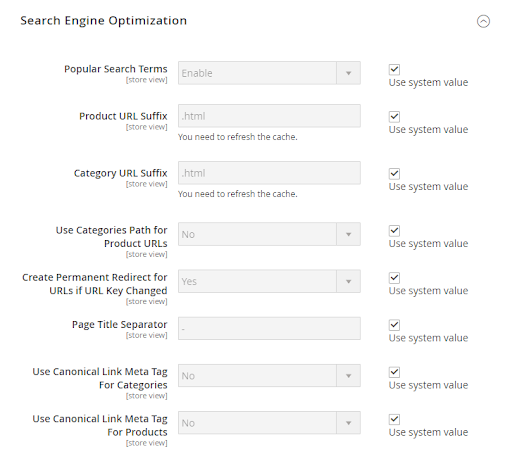
For the webmasters using Magento 2 CMS, take the following steps to implement canonical tags to your website.
Step 1: Log into the admin panel. ‘Stores > Settings > Configuration’.
Step 2: Go to the ‘Catalog’ section and open the ‘Search Engine Optimization’ section. (Image required)
Image source: – Semrush
Step 3: In the ‘Use Canonical Link Meta Tag For Products’ dropdown, select ‘Yes’.
Step 4: In the SEO section, ‘Use Canonical Meta Tags For Categories’ and select ‘Yes’ from the dropdown. All alternate product pages will automatically be updated with canonical tags.
Step 5: Follow the above step for ‘Use Canonical Meta Tags For Products’ too and alternate product pages will be automatically updated with canonical tags.
WordPress
How to add a canonical tag in WordPress? It’s quite simple, thanks to two awesome WordPress plug-ins, Yoast SEO and Rank Math SEO, which make this task a breeze. Let’s check out how to go about using both plug-ins
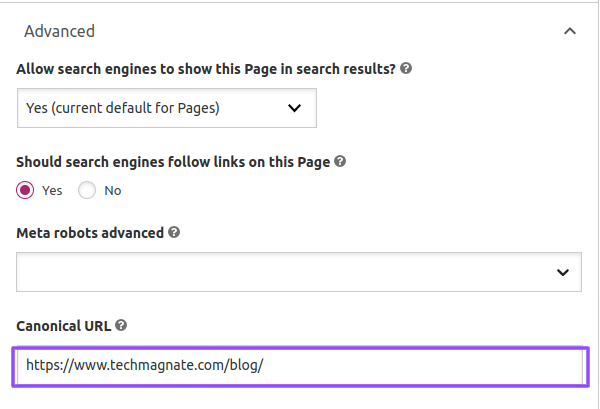
Yoast SEO
Step 1: Open your page in WordPress
Step 2: Go to Yoast SEO options and click on the ‘Advanced’ tab.
Step 3: Add your canonical tag to the ‘Canonical URL’ bar, and you are done. (Image required)
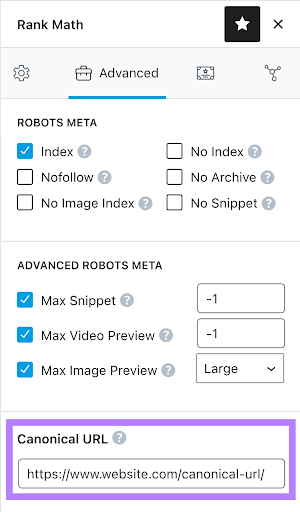
Rank Math SEO
Step 1: Open your page in WordPress
Step 2: Go to Rank Math SEO options and click on the ‘Advanced’ tab.
Step 3: Add your canonical tag to the ‘Canonical URL’ bar, and you are done. (Image required)
Wix
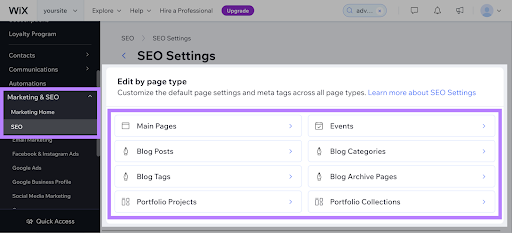
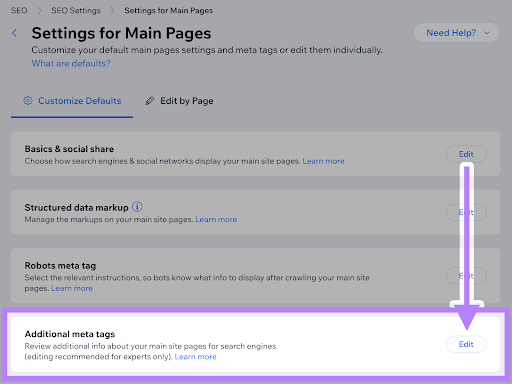
As Wix creates a website for you, it also automatically creates a self-referencing canonical tag. If you wish to change the canonical tag’s structure, take the following steps:
Step 1: Choose the page you want to edit by going to ‘Marketing & SEO > SEO > SEO Settings’> Let’s edit the ‘Main Pages’ for this exercise.
Step 2: In the SEO Settings, select and click ‘Main Pages’. (Image required)
Step 3: Once in, navigate to the ‘Additional Meta Tags’ section and click ‘Edit’ (Image required)
Common Mistakes to Avoid for Canonical Tags
Implementing a canonical tag isn’t rocket science, but an erroneous one can lead to Google penalties and a drop in rankings. Thus, it’s best to know the common mistakes you should avoid before starting with canonical tags.
Directing canonical tags to pages with redirects
To ensure Google doesn’t get confused with a wrong canonical tag, make sure that the canonical URL isn’t redirecting. For example, if https://www.techmagnate.com/blog/?page=1 is being redirected to https://www.techmagnate.com/blog/, then do not use a canonical tag in the first URL.
Non-duplicate content canonical tags
There’s no benefit of using canonical tags for URLs with non-duplicate content as Google will most likely ignore these tags. Google advises against using this trick, which has been in place for a while.
Using robots.txt on canonicalized tag URLs
Ensure that you don’t add a robots.txt to a canonicalized tag URL as Google will not index the page nor be able to identify the canonical tag on the page. This leads to a loss of link equity and the page with the canonical tag goes to waste.
Multiple Canonical Tags on a Single Page
Having more than one canonical tag on a page creates confusion for search engines. To avoid this issue, ensure only one canonical tag is added per page and is placed correctly in the <head> section.
Inconsistent Canonical URL Protocols (HTTP vs. HTTPS)
If your site uses HTTPS, make sure the canonical tag reflects this protocol. Google treats HTTP and HTTPS versions as separate entities, so consistency in specifying the correct protocol is crucial for accurate indexing.
Pointing Canonical Tags to Non-Canonical Versions
Canonical tags should always point to the primary version of the page. Avoid linking canonical tags to alternate or lesser versions, as this could dilute SEO effectiveness.
By understanding and avoiding these mistakes, you can help ensure your canonical tags perform as expected, enhancing your site’s SEO structure and visibility. Proper implementation helps search engines better index your content and prevents unnecessary SEO penalties.
Common Canonical URL Myths & Misconceptions
Canonical URLs are a crucial aspect of SEO, but many myths surround them. Here are some common misconceptions about canonical tags and their usage:
1. Canonical Tags Are Only for Duplicate Content
This is a common myth. While canonical tags are often used to deal with duplicate content, they’re also useful for other cases, like handling URL variations (e.g., parameters, mobile versions, or HTTP vs. HTTPS). Canonical tags help consolidate content and prevent confusion for search engines about which page to index.
2. Canonical Tags Help Users with Navigation
Canonical tags are for search engines, not users. They tell search engines which URL is the “preferred” version of a page when multiple pages have similar content. They do not improve the user navigation experience on your site.
3. Canonical Tags Should Be Added to All Pages
This is not true. Canonical tags should only be used on pages where there’s duplicate or very similar content. For example, if a page has unique content, it doesn’t need a canonical tag. Adding them to all pages can be unnecessary and complicate things.
4. If You Have a Canonical Tag, You Don’t Need to Worry About URL Structure
While canonical tags can help manage duplicate content, they cannot replace a well-organized URL structure. A clean, user-friendly URL structure is still critical for SEO. Canonical tags don’t fix fundamental structural issues or broken URLs.
5. A Canonical Tag Will Automatically Fix Duplicate Content
A canonical tag helps indicate the preferred version of a page, but it doesn’t “remove” duplicate content from a website. Poor internal linking, wrong canonical tag usage, or unoptimized URL structures can still lead to duplicate content issues. Canonical tags work as part of a broader SEO strategy to address duplicates.
6. Only One Canonical Tag Per Website
You can use canonical tags on multiple pages of your website. If different pages contain similar or duplicate content, each of those pages can have a canonical tag pointing to the primary version of that content. For example, product pages with different URL parameters or filters can each use a canonical tag to point to the main product page.
7. A Canonical Tag Can Redirect Users to the Main Page
Canonical tags inform search engines about the preferred URL but do not redirect users. To redirect users, you would need to use a 301 redirect, not a canonical tag. The canonical tag only signals to search engines which page should be indexed.
8. Canonical Tags Can Fix Content Crawling Issues
While canonical tags help search engines understand which page to index, they cannot resolve crawling issues like blocked resources or poor site structure. Proper technical SEO, including clean sitemaps and accessible resources, is still essential for good site performance.
9. You Can Use Canonical Tags on Redirected Pages
Canonical tags should not be used on pages that are already being redirected (e.g., via 301 redirects). Since the page is already redirected, the canonical tag is redundant, as Google will follow the redirect and index the target page.
10. The Canonical Tag Must Always Point to the Home Page
A canonical tag should point to the most relevant or authoritative version of a page, not necessarily the homepage. For instance, if you have product pages with various filters, the canonical tag should point to the main version of that product page, not the homepage.
How to Audit Canonical Tags?
One of the vital elements of comprehensive SEO maintenance is to conduct regular audits of the canonical tags. The audit ensures that the tags are well-structured and that search engines correctly identify and index the preferred versions of your web pages.
Here’s a step-by-step guide on conducting canonical tags audit:
Use a tool like Screaming Frog, Ahrefs, or Google Search Console to crawl your website and generate a list of all URLs.
Check each page for the presence of a canonical tag in the HTML head section. This is usually in the format: <link rel=”canonical”.
Ensure that the canonical tags are properly formatted and contain absolute URLs (including http:// or https://).
Verify that the URL in the canonical tag matches the URL of the page it’s on. Inconsistencies can confuse search engines.
Look for multiple pages with similar or duplicate content. Ensure these pages have canonical tags pointing to the preferred (canonical) version.
Check if any canonical tags point to redirected URLs. The canonical URL should be the final destination URL, not a redirect chain.
Use tools like Google Search Console to verify that search engines are indexing the canonical pages and not the non-canonical ones.
Look for pages that are canonical but also have a ‘no index’ tag. This can be contradictory and should be resolved.
Ensure that the URLs in your sitemap match the canonical URLs. The sitemap should not contain non-canonical URLs.
Use analytics tools to monitor the traffic and rankings of your canonical pages. A drop in traffic or rankings might indicate an issue with the canonicalization.
Final Thoughts
Navigating the intricate world of canonical URLs and tags can seem daunting at first, but as we’ve explored in this blog, their correct implementation is pivotal for SEO success.
It’s not just about avoiding penalties or duplicate content issues; it’s about making sure search engines understand and index your website properly. If you’re dealing with issues from algorithm changes, checking out Google Penalty Recovery services can be very helpful.
By adopting best practices for canonical tags and URLs, you ensure that search engines are directed to the most relevant and authoritative version of your content, enhancing your site’s visibility and user experience.
Contact us to get the best and reliable SEO services that take care of your canonical tag issues, while optimizing your website. Reach the top of search engine rankings and watch your web traffic soar.
Frequently Asked Questions (FAQs)
Why should I use canonical tags?
Canonical tags help search engines understand which version of a page is the most important when there’s duplicate content. They prevent SEO issues like duplicate content penalties and help consolidate your page rankings, ensuring your best page gets credit.
Should I canonicalize paginated pages to the root page?
No, it’s generally not recommended. Each paginated page should have its own canonical tag pointing to itself, unless the content is exactly the same across pages. Canonicalizing the root page can confuse search engines and harm indexing.
Is it okay to have multiple canonical tags?
No, each page should only have one canonical tag pointing to the preferred URL. Multiple canonical tags can confuse search engines, leading to incorrect indexing or ranking issues.
How to Find & Fix Rel Canonical Problems?
Use SEO tools like Google Search Console or Screaming Frog to check for incorrect or missing canonical tags. If a problem is found, update the tag to point to the correct URL or remove any conflicting tags to resolve the issue.
This part tells Google that this is the original page for indexing and ranking.
How do I put a canonical tag in HTML?
You put a canonical tag in the <head> part of your HTML page code.For instance:
This helps search engines find the master URL and stops duplicate content from happening.
How do hreflang tags and canonical tags differ?
Hreflang tags tell search engines what language or regional version of a page a user wants to see. Canonical tags let search engines know which version of a page they should use to index it. You can use both of these on websites that are in more than one language or country.
Can canonical tags be used with content from more than one domain?
Yes, You can use a cross-domain canonical tag to link back to the original source URL when you republish content on a different domain, like a guest post or syndicated content. This keeps SEO value in one place and avoids problems with duplicate content on different domains.
Do canonical tags have a direct effect on how high your site ranks on Google?
They don't change how Google sees or indexes your site directly, but they do have a big impact. By stopping keyword cannibalization and combining authority signals, correct canonicalization makes sure that your most important pages rank higher.
How often should I look at my canonical tags?
You should look at your canonical tags at least once every three months or after making big changes to your site. Tools like Screaming Frog and Sitebulb can help you find problems with your SEO, like tags that are missing or wrong.
Sarvesh Bagla is an enterprise SEO expert and industry leader who has driven transformational digital growth for India’s top brands across the BFSI, Healthcare, Automotive, and ECommerce industries. As the Founder and CEO of Techmagnate, he leads large-scale organic search strategies and performance marketing campaigns for businesses looking to succeed in today’s AI-driven search landscape.
A strong advocate for thought leadership, Sarvesh is deeply involved in SEO evangelism and regularly contributes to industry discussions through LinkedIn, webinars, and CMO roundtables. His focus today is on helping brands prepare for an AI-first SEO future (AEO, GEO) and strategies for Large Language Models (LLMs) at the core.
Get the most valuable search related insights about leading brands, trending keywords, search volumes, fastest growing categories, city-level insights and much more!
It has come to our notice that fraudulent job offers are being circulated on the internet through messaging apps like WhatsApp and Telegram, which falsely claim to be from Techmagnate. We take this matter seriously and would like to caution all candidates to be wary of such postings.
Please Note That –
We do not charge any fees/security deposit/payment from candidates, irrespective of the professional experience they hold, for job applications or interviews
Official communication channels include our website and verified social media accounts, primarily LinkedIn.
Kindly double-check the domain name – @techmagnate.com – in the email address
We follow a transparent and ethical approach for hiring/onboarding supported by proper documentation.
Ensure that you only apply through verified channels to avoid being scammed. We also recommend that you exercise caution when sharing personal information or financial details with any job posting or recruitment agencies claiming to represent us.
We want to ensure that potential candidates interested in joining Techmagnate have a safe and positive experience.
If you find that someone that fits the description above has reached out to you, please notify us immediately at jobs@techmagnate.com.
 Important Alert:
 Important Alert:






















 6th Feb | Invite-only


